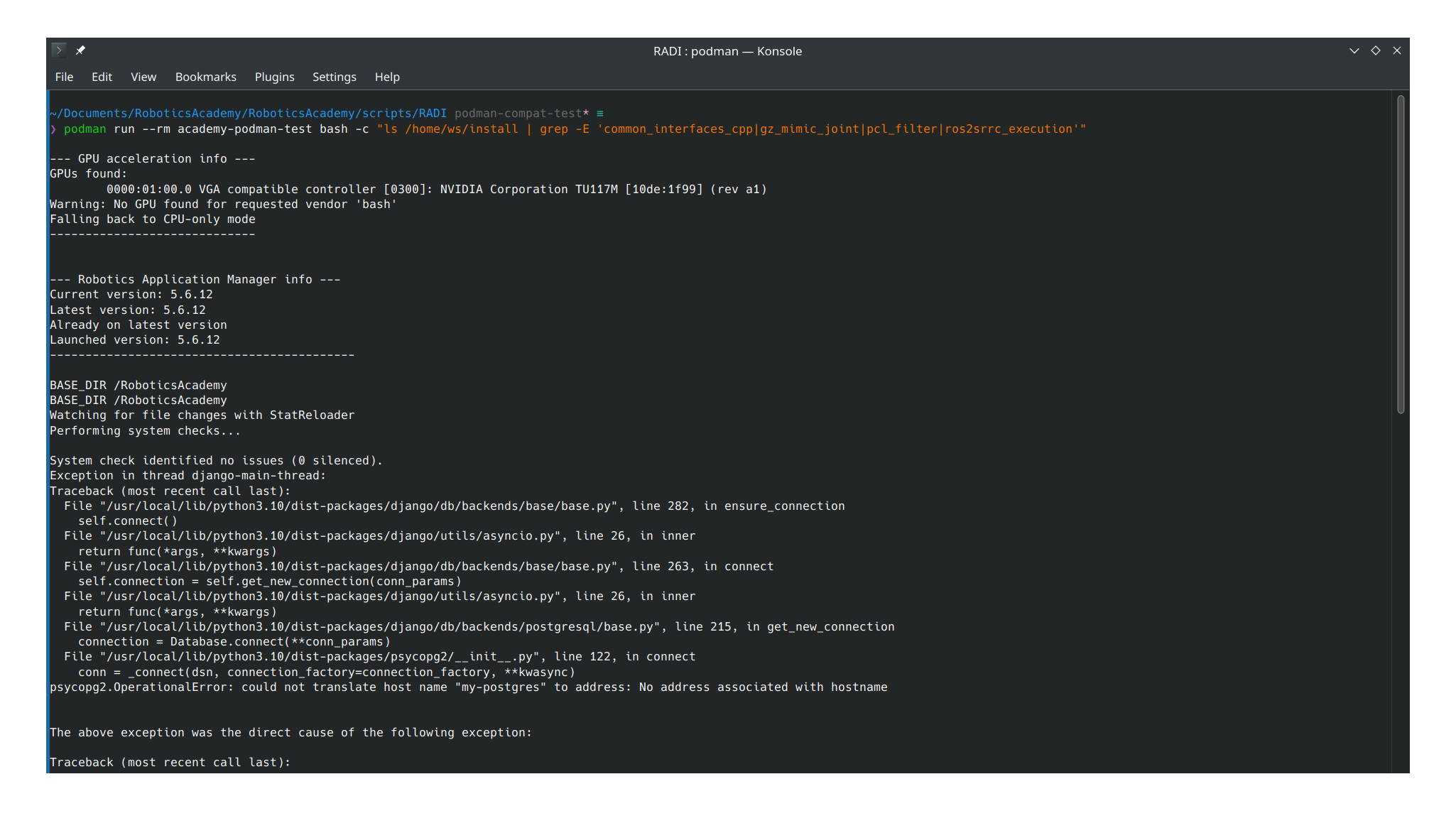
<?xml version="1.0" encoding="utf-8"?><feed xmlns="http://www.w3.org/2005/Atom" ><generator uri="https://jekyllrb.com/" version="4.4.1">Jekyll</generator><link href="https://theroboticsclub.github.io/gsoc2026-Kartik_Jangid/feed.xml" rel="self" type="application/atom+xml" /><link href="https://theroboticsclub.github.io/gsoc2026-Kartik_Jangid/" rel="alternate" type="text/html" /><updated>2026-08-22T22:44:19+00:00</updated><id>https://theroboticsclub.github.io/gsoc2026-Kartik_Jangid/feed.xml</id><title type="html">Kartik’s GSoC 2026 Blog</title><subtitle>GSoC 2026 blog</subtitle><author><name>Kartik Jangid</name><email></email></author><entry><title type="html">GSoC 2026 Final Report - Optimizing RoboticsAcademy’s Container Infrastructure</title><link href="https://theroboticsclub.github.io/gsoc2026-Kartik_Jangid/gsoc/final-report/gsoc-final-report/" rel="alternate" type="text/html" title="GSoC 2026 Final Report - Optimizing RoboticsAcademy’s Container Infrastructure" /><published>2026-08-21T00:00:00+00:00</published><updated>2026-08-21T00:00:00+00:00</updated><id>https://theroboticsclub.github.io/gsoc2026-Kartik_Jangid/gsoc/final-report/gsoc-final-report</id><content type="html" xml:base="https://theroboticsclub.github.io/gsoc2026-Kartik_Jangid/gsoc/final-report/gsoc-final-report/"><![CDATA[<p>This is the final report for GSoC 2026 Project #7 with JdeRobot: optimizing the RoboticsBackend container. The project had two goals: cut the container’s size and build time, and evaluate replacing Docker with Podman.</p>

<p>Hi 🤝, I’m Kartik. This was my open source project this summer. I’ve contributed to JdeRobot since January, and before that was a Research Intern at GahanAI, working on a humanoid robotics survey paper. My ML journey started about a year ago.</p>

<p>The starting point, measured during community bonding, was a 29.5GB image built across 30 layers, with a cold build taking 102 minutes 50 seconds.</p>

<p>My mentors were David Pascual-Hernández, Javier Izquierdo, Md. Shariar Kabir, and Nikhil Gupta. Javier reviewed and merged the seven PRs that shipped.</p>

<h2 id="what-exists-now">What Exists Now</h2>

<p>RoboticsBackend is smaller than it was in May. My four merged PRs (cache cleanup, the ghost-layer fix, the PyTorch swap, the ARG/ENV fix) brought the image from 29.5GB to 18.2GB. Alongside that, not after it, Javier’s parallel PR removing legacy Gazebo 11 dependencies (#3875, merged 2026-06-23) took it to 10.7GB, a combined 18.8GB drop, roughly 64%. A working rootless-Podman path with GPU passthrough also exists via three more merged PRs: <code class="language-plaintext highlighter-rouge">sudo apt install podman podman-compose</code> plus the <code class="language-plaintext highlighter-rouge">video</code> and <code class="language-plaintext highlighter-rouge">render</code> groups.</p>

<p>Two things are tested but not shipped: a multi-stage rebuild of <code class="language-plaintext highlighter-rouge">Dockerfile.dependencies_humble</code> reached 9.55GB in testing, but it’s on hold since the size win didn’t justify the build complexity. A rootless file-permission fix is also open.</p>

<p>One known limitation ships as-is: Ctrl+C during <code class="language-plaintext highlighter-rouge">podman-compose up</code> doesn’t stop the stack, since <code class="language-plaintext highlighter-rouge">podman-compose</code> 1.0.6 doesn’t act on <code class="language-plaintext highlighter-rouge">SIGINT</code>. Workaround: a second terminal running <code class="language-plaintext highlighter-rouge">podman-compose down</code>.</p>

<h2 id="phase-1-shrinking-the-image">Phase 1: Shrinking the Image</h2>

<h3 id="pr-3848--cache-cleanup">PR #3848 — Cache Cleanup</h3>

<p>Both Dockerfiles were leaking build cache: apt cleanup wasn’t clearing package lists, and pip installs were missing <code class="language-plaintext highlighter-rouge">--no-cache-dir</code>. Both fixed, along with two dead packages, <code class="language-plaintext highlighter-rouge">netron</code> and <code class="language-plaintext highlighter-rouge">seaborn</code>. Full image: 29.5GB to 26.4GB; <code class="language-plaintext highlighter-rouge">dependencies_humble</code> dropped 3.4GB.</p>

<h3 id="pr-3856--the-ghost-layer">PR #3856 — The Ghost Layer</h3>

<p>Cloning <code class="language-plaintext highlighter-rouge">RoboticsInfrastructure</code>, moving its contents, then deleting <code class="language-plaintext highlighter-rouge">.git</code> were three separate <code class="language-plaintext highlighter-rouge">RUN</code> instructions, so the ~4.6GB clone stayed baked in regardless. One atomic <code class="language-plaintext highlighter-rouge">RUN</code> fixed it. Full image: 26.4GB to 21.8GB.</p>

<h3 id="pr-3863--pytorch-out-cuda-wheels-in-merged-2026-06-12">PR #3863 — PyTorch Out, CUDA Wheels In (merged 2026-06-12)</h3>

<p>David asked whether I could replace PyTorch with something lighter, since we only do inferencing, not training. The fix swapped in seven hard-pinned CUDA wheels plus a linker-cache entry to survive ROS 2 sourcing; Javier caught a protobuf crash in review, fixed by forcing Python’s pure protobuf implementation. Net reduction was smaller than the claimed 4.7GB; <code class="language-plaintext highlighter-rouge">dependencies_humble</code> sat at 12.8GB after merge.</p>

<h3 id="pr-3890--two-small-correctness-fixes-merged-2026-07-20">PR #3890 — Two Small Correctness Fixes (merged 2026-07-20)</h3>

<p><code class="language-plaintext highlighter-rouge">NVIDIA_VISIBLE_DEVICES</code> had been a build <code class="language-plaintext highlighter-rouge">ARG</code>, silently breaking GPU visibility; changed to <code class="language-plaintext highlighter-rouge">ENV</code>. A second fix removed a dead <code class="language-plaintext highlighter-rouge">source</code> command with no effect. No size change; pure correctness.</p>

<h3 id="the-multi-stage-build-pr-3900--open-on-hold-not-merged">The Multi-Stage Build (PR #3900 — open, on hold, not merged)</h3>

<p>The plan was to split <code class="language-plaintext highlighter-rouge">Dockerfile.dependencies_humble</code> into a builder and a slim runtime stage, harder than expected since part of the source tree is still needed at runtime. Fixing an early regression brought the image from 11.9GB to 10.7GB, later refined to 9.55GB. It didn’t ship: build time roughly doubled, from 20 to 40 minutes, so it’s been open since July, still in draft.</p>

<h3 id="pr-3953--rootless-file-permissions-open-not-merged">PR #3953 — Rootless File Permissions (open, not merged)</h3>

<p>Saving workspace files under Podman threw a blank error popup: five <code class="language-plaintext highlighter-rouge">os.chmod(path, 0o777)</code> calls fail under rootless containers, since Podman’s “root” can write to a file it doesn’t own but can’t change its permissions. The fix removes all five calls. Still open.</p>

<h2 id="phase-2-podman-rootless-and-the-gpu">Phase 2: Podman, Rootless, and the GPU</h2>

<p>Docker has a rootless mode too, but needs a daemon and manual setup; Podman is daemonless by design. The first Podman build failed on an unqualified base image reference, since Podman won’t assume Docker Hub by default. Fixed via Podman’s registry config, not the Dockerfile.</p>

<p>Getting the compose stack running took setup around Podman’s socket and image store. Autosave also failed on a file created under Docker: rootless Podman can write new content into a file it doesn’t own, but can’t <code class="language-plaintext highlighter-rouge">chmod</code> it, the same bug PR #3953 later fixes.</p>

<p>GPU passthrough needed the Container Device Interface (CDI) instead of Docker-style runtime hooks, which surfaced the hardest bug: <code class="language-plaintext highlighter-rouge">nvidia-ctk</code> generates CDI specs with a field, <code class="language-plaintext highlighter-rouge">additionalGids</code>, that Ubuntu 24.04’s shipped Podman (4.9.3) can’t parse, silently falling back to CPU. The passthrough that first worked had been tested on Podman 6.0.2; the real 4.9.3 reproduced the failure. The fix, from an upstream NVIDIA issue, was a compatibility flag generating an older-format spec 4.9.3 can read. Once pinned, it’s just <code class="language-plaintext highlighter-rouge">sudo apt install podman podman-compose</code> plus the <code class="language-plaintext highlighter-rouge">video</code> and <code class="language-plaintext highlighter-rouge">render</code> groups. Passthrough was then confirmed working via <code class="language-plaintext highlighter-rouge">vglrun glxinfo</code>.</p>

<p>Two PRs shipped here: #3959 (2026-08-07), new CDI compose files, and #3960 (2026-08-13), a <code class="language-plaintext highlighter-rouge">-p</code> flag switching launcher scripts to <code class="language-plaintext highlighter-rouge">podman-compose</code>.</p>

<h2 id="phase-3-documentation">Phase 3: Documentation</h2>

<p>PR #3961 (merged 2026-08-13) added a standalone Podman setup guide: install, CDI setup, <code class="language-plaintext highlighter-rouge">-p</code> launch, GPU verification, and Docker migration, linked from existing docs.</p>

<h2 id="demo-video">Demo Video</h2>

<p>https://youtu.be/XqefB9AnR3w</p>

<h2 id="pull-requests">Pull Requests</h2>

<table>
  <thead>
    <tr>
      <th>PR</th>
      <th>Title</th>
      <th>Status</th>
    </tr>
  </thead>
  <tbody>
    <tr>
      <td><a href="https://github.com/JdeRobot/RoboticsAcademy/pull/3848">#3848</a></td>
      <td>apt cache cleanup, pip –no-cache-dir</td>
      <td>Merged 2026-06-01</td>
    </tr>
    <tr>
      <td><a href="https://github.com/JdeRobot/RoboticsAcademy/pull/3856">#3856</a></td>
      <td>eliminate RoboticsInfrastructure ghost layer</td>
      <td>Merged 2026-06-08</td>
    </tr>
    <tr>
      <td><a href="https://github.com/JdeRobot/RoboticsAcademy/pull/3863">#3863</a></td>
      <td>replace PyTorch with minimal CUDA wheels</td>
      <td>Merged 2026-06-12</td>
    </tr>
    <tr>
      <td><a href="https://github.com/JdeRobot/RoboticsAcademy/pull/3890">#3890</a></td>
      <td>fix NVIDIA_VISIBLE_DEVICES scope, remove no-op source</td>
      <td>Merged 2026-07-20</td>
    </tr>
    <tr>
      <td><a href="https://github.com/JdeRobot/RoboticsAcademy/pull/3900">#3900</a></td>
      <td>multi-stage build for Dockerfile.dependencies_humble</td>
      <td><strong>Open, draft — on hold, not merged</strong></td>
    </tr>
    <tr>
      <td><a href="https://github.com/JdeRobot/RoboticsAcademy/pull/3953">#3953</a></td>
      <td>remove chmod 777 for rootless compatibility</td>
      <td><strong>Open — not merged</strong></td>
    </tr>
    <tr>
      <td><a href="https://github.com/JdeRobot/RoboticsAcademy/pull/3959">#3959</a></td>
      <td>rootless Podman + NVIDIA CDI compose files</td>
      <td>Merged 2026-08-07</td>
    </tr>
    <tr>
      <td><a href="https://github.com/JdeRobot/RoboticsAcademy/pull/3960">#3960</a></td>
      <td>add -p flag to launcher scripts</td>
      <td>Merged 2026-08-13</td>
    </tr>
    <tr>
      <td><a href="https://github.com/JdeRobot/RoboticsAcademy/pull/3961">#3961</a></td>
      <td>add Podman documentation</td>
      <td>Merged 2026-08-13</td>
    </tr>
  </tbody>
</table>

<h2 id="future-work">Future Work</h2>

<p>A CPU-only Windows/WSL2 test loaded the web interface under rootless Podman, but the robot didn’t respond to exercise code. Two more PRs continue that direction: #3966 (Windows GPU compose) and #3973 (WSL2 NVIDIA workflow). The compose setup also has 8 nearly-identical files across {user, dev} × {cpu, gpu, nvidia, nvidia-windows} needing updates.</p>

<h2 id="challenges-and-what-i-learned">Challenges and What I Learned</h2>

<p>The hardest problem for me was to write the perfect documentation which needs to be very simple but also covers everything so that any user or developer does not need to sit for hours to start using RoboticsAcademy with Podman. I was able to find a way to run it in my system, but finding out the simplest to run it in every system was challenging. The other major one was the Podman GPU passthrough bug: an undocumented <code class="language-plaintext highlighter-rouge">additionalGids</code> field in the CDI spec that Ubuntu’s own shipped Podman couldn’t parse, silently falling back to CPU with no error at all. Finding it meant realizing that the environment I’d been developing and testing against, a newer Podman installed via Homebrew, wasn’t the environment a real user would have.</p>

<h2 id="thanks">Thanks</h2>

<p>Thanks to my mentors on this project: David Pascual-Hernández and Javier Izquierdo, and Nikhil Gupta and Md. Shariar Kabir.</p>

<p><em>Part of my GSoC 2026 work with JdeRobot. Project tracked at <a href="https://github.com/TheRoboticsClub/gsoc2026-Kartik_Jangid">github.com/TheRoboticsClub/gsoc2026-Kartik_Jangid</a>.</em></p>]]></content><author><name>Kartik Jangid</name></author><category term="gsoc" /><category term="final-report" /><category term="docker" /><category term="gsoc2026" /><category term="jderobot" /><category term="podman" /><category term="optimization" /><category term="multi-stage-build" /><category term="rootless" /><category term="cuda" /><category term="protobuf" /><category term="cdi" /><summary type="html"><![CDATA[This is the final report for GSoC 2026 Project #7 with JdeRobot: optimizing the RoboticsBackend container. The project had two goals: cut the container’s size and build time, and evaluate replacing Docker with Podman.]]></summary></entry><entry><title type="html">Testing the RoboticsAcademy CPU Workflow on Windows with Podman</title><link href="https://theroboticsclub.github.io/gsoc2026-Kartik_Jangid/gsoc/coding-period/coding-week-12/" rel="alternate" type="text/html" title="Testing the RoboticsAcademy CPU Workflow on Windows with Podman" /><published>2026-08-12T12:30:00+00:00</published><updated>2026-08-12T12:30:00+00:00</updated><id>https://theroboticsclub.github.io/gsoc2026-Kartik_Jangid/gsoc/coding-period/coding-week-12</id><content type="html" xml:base="https://theroboticsclub.github.io/gsoc2026-Kartik_Jangid/gsoc/coding-period/coding-week-12/"><![CDATA[<p>We tested the RoboticsAcademy CPU development workflow on Windows using WSL2, rootless Podman, podman-compose 1.6.0, and Podman 5.8.3.</p>

<h3 id="initial-attempt">Initial Attempt</h3>
<p>The first test with <code class="language-plaintext highlighter-rouge">user_humble_cpu.yaml</code> showed that Podman could start the stack, but the current <code class="language-plaintext highlighter-rouge">jderobot/robotics-academy:latest</code> image could not initialize Django because the required <code class="language-plaintext highlighter-rouge">react_frontend</code> Python files were absent from the image. We verified this directly from the image contents, establishing that this was independent of Podman.</p>

<h3 id="development-workflow">Development Workflow</h3>
<p>We then moved to <code class="language-plaintext highlighter-rouge">dev_humble_cpu.yaml</code>. One important Podman-specific detail was relative bind-mount resolution. With the compose file under <code class="language-plaintext highlighter-rouge">compose_cfg</code>, paths such as <code class="language-plaintext highlighter-rouge">./database</code> were resolved relative to that directory. Using the repository’s documented Windows approach of placing the development configuration at the repository root as <code class="language-plaintext highlighter-rouge">docker-compose.yaml</code> allowed the expected bind mounts to resolve correctly.</p>

<h3 id="frontend">Frontend</h3>
<p>Because the development configuration bind-mounts the repository into the container, the local frontend artifacts also needed to be generated. We installed the frontend dependencies, generated <code class="language-plaintext highlighter-rouge">common.zip</code>, and successfully built the frontend, producing <code class="language-plaintext highlighter-rouge">webpack-stats.json</code>.</p>

<p>The first browser run exposed a React runtime error. Rebuilding the frontend with an explicit <code class="language-plaintext highlighter-rouge">NODE_ENV=production</code> resolved that error and allowed the RoboticsAcademy web interface to load.</p>

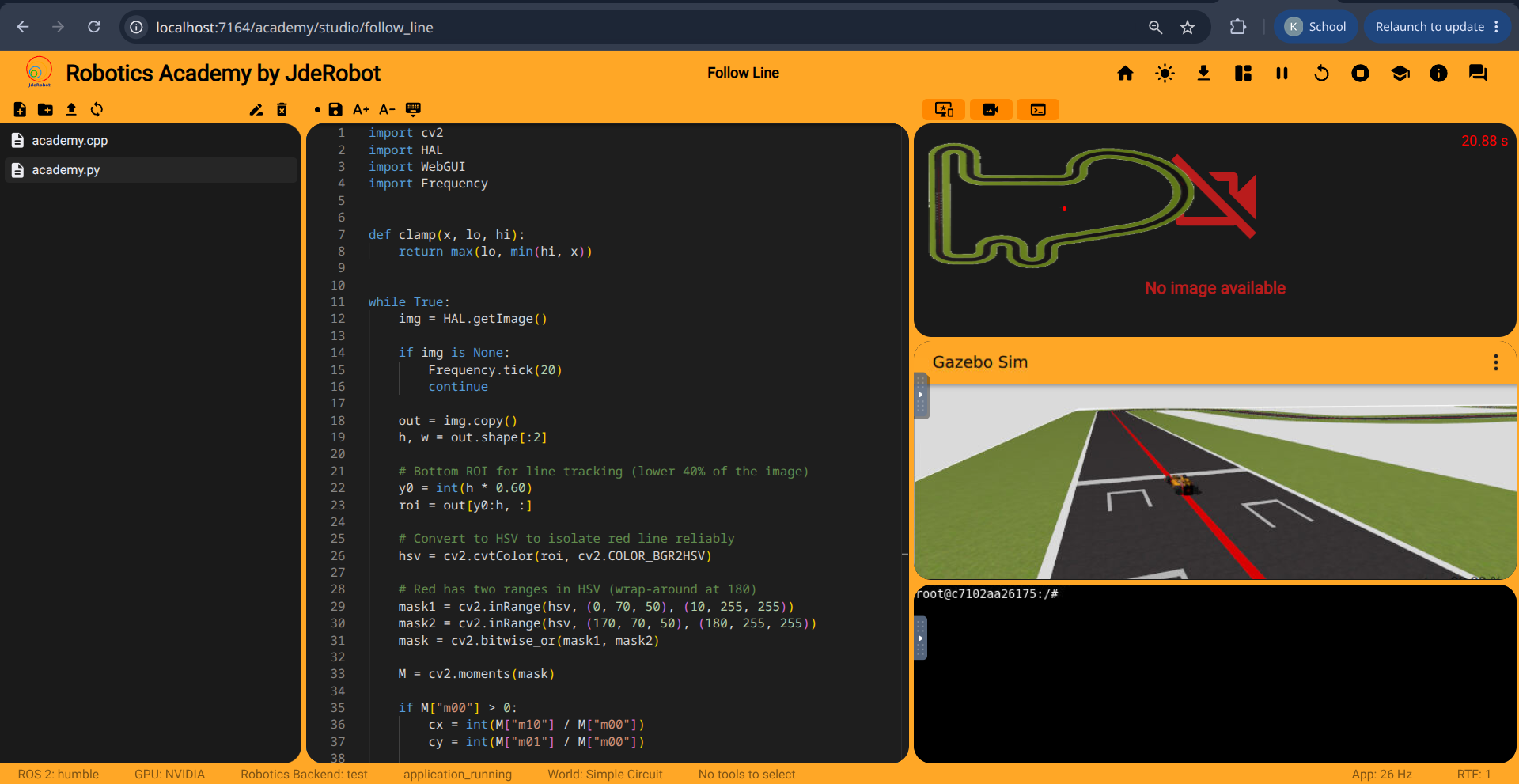
<p><img src="/gsoc2026-Kartik_Jangid/assets/images/week12/follow_line_test.png" alt="RoboticsAcademy web interface successfully loaded with the Follow Line exercise and Gazebo simulation visible, though the car is not moving" /></p>

<h3 id="current-state">Current State</h3>
<p>The CPU stack is now running successfully on Windows with WSL2, rootless Podman, and podman-compose. The RoboticsAcademy website is accessible on <code class="language-plaintext highlighter-rouge">localhost:7164</code>, and the Follow Line exercise interface and Gazebo simulation load correctly.</p>

<p>However, this does NOT yet mean the exercise itself is fully functional. The current remaining issue is robot execution/actuation: the Follow Line simulation is visible, but the car does not currently respond and move as expected when the exercise code is running.</p>

<p>We have therefore verified the containerized application and frontend stack, but not yet the complete end-to-end exercise workflow.</p>

<h3 id="next-step">Next Step</h3>
<p>Before moving to GPU testing, the CPU investigation should identify why the robot is not responding and verify one complete exercise execution under Podman.</p>

<p>Once that works, we can use the working CPU configuration as the baseline for investigating the GPU workflow.</p>]]></content><author><name>Kartik Jangid</name></author><category term="gsoc" /><category term="coding-period" /><category term="docker" /><category term="gsoc2026" /><category term="jderobot" /><category term="podman" /><category term="rootless" /><category term="windows" /><category term="wsl2" /><summary type="html"><![CDATA[We tested the RoboticsAcademy CPU development workflow on Windows using WSL2, rootless Podman, podman-compose 1.6.0, and Podman 5.8.3.]]></summary></entry><entry><title type="html">Coding Week 11 — Documenting Podman for Users</title><link href="https://theroboticsclub.github.io/gsoc2026-Kartik_Jangid/gsoc/coding-period/coding-week-11/" rel="alternate" type="text/html" title="Coding Week 11 — Documenting Podman for Users" /><published>2026-08-10T00:00:00+00:00</published><updated>2026-08-10T00:00:00+00:00</updated><id>https://theroboticsclub.github.io/gsoc2026-Kartik_Jangid/gsoc/coding-period/coding-week-11</id><content type="html" xml:base="https://theroboticsclub.github.io/gsoc2026-Kartik_Jangid/gsoc/coding-period/coding-week-11/"><![CDATA[<p>This week’s goal was mostly to find out the simplest documentation for users
running Podman, and to make draft PRs for the compose files and scripts so the
mentors can test them.</p>

<h2 id="the-simplest-documentation-problem">The simplest documentation problem</h2>

<p>One of the biggest challenges I faced during the whole coding period was
finding the exact workflow any Linux user can follow to run Podman, while
keeping it as simple as possible.</p>

<p>Last week, when I ran RoboticsAcademy with and without GPU passthrough, I was
using Podman 6.0.2 and podman-compose 1.6.0. Neither of those comes from
Ubuntu 24.04’s apt packages. I had installed Podman through Homebrew and
podman-compose through pip. So I wanted to find a solution that works with
Podman 4.9.3, the version Ubuntu 24.04 actually ships.</p>

<p>The blocker was that <code class="language-plaintext highlighter-rouge">nvidia-ctk</code> generates a CDI specification containing an
<code class="language-plaintext highlighter-rouge">additionalGids</code> field, which Podman 4.9.3 cannot parse, so it rejects the whole
file and finds no GPU. Thankfully NVIDIA had already proposed a solution in
this issue: https://github.com/NVIDIA/nvidia-container-toolkit/issues/1860.
Generating the spec with <code class="language-plaintext highlighter-rouge">--feature-flag no-additional-gids-for-device-nodes</code>
produces an older format that 4.9.3 reads fine.</p>

<p>Once I was on 4.9.3, two other problems I had been documenting disappeared.
Ubuntu’s podman-compose 1.0.6 and crun 1.14.1 both work correctly with it.
They only break against the newer Podman I had been using. So the whole
installation step is now just <code class="language-plaintext highlighter-rouge">sudo apt install podman podman-compose</code>.</p>

<p>One extra step users do need: they must add themselves to the <code class="language-plaintext highlighter-rouge">video</code> and
<code class="language-plaintext highlighter-rouge">render</code> groups. The compatibility flag above works by removing the group IDs
from the spec, so those permissions have to come from the host instead.</p>

<h2 id="container-stopping-challenge">Container stopping challenge</h2>

<p>Normally, when a container is running in the terminal and the user presses
Ctrl+C, Docker stops it. Podman doesn’t. The application shuts down its
launchers, but the container keeps running and serving requests.</p>

<p>The reason is that podman-compose 1.0.6 doesn’t exit on SIGINT, and the
cleanup code in the script never gets a chance to run. To stop the stack, a
separate <code class="language-plaintext highlighter-rouge">podman-compose -p roboticsacademy down</code> has to be run from the
project root directory in a second terminal.</p>

<h2 id="work-done-this-week">Work done this week</h2>

<p>Apart from the documentation work, there are now three PRs open:</p>

<ul>
  <li>Documentation: https://github.com/JdeRobot/RoboticsAcademy/pull/3961</li>
  <li>Scripts, adding the <code class="language-plaintext highlighter-rouge">-p</code> flag for Podman:
https://github.com/JdeRobot/RoboticsAcademy/pull/3960</li>
  <li>Compose files for Podman:
https://github.com/JdeRobot/RoboticsAcademy/pull/3959</li>
</ul>

<h2 id="next-weeks-targets">Next week’s targets</h2>

<ol>
  <li>Test the problems and workflow for Windows users</li>
  <li>
    <p>Change in PR #3961: move the Podman instructions into a separate file
rather than adding them to InstructionsForDevelopers</p>
  </li>
  <li>Testing the podman documentation by setting everything up from scratch</li>
</ol>

<p><em>Part of my GSoC 2026 work with JdeRobot. Project tracked at <a href="https://github.com/TheRoboticsClub/gsoc2026-Kartik_Jangid">github.com/TheRoboticsClub/gsoc2026-Kartik_Jangid</a>.</em></p>]]></content><author><name>Kartik Jangid</name></author><category term="gsoc" /><category term="coding-period" /><category term="docker" /><category term="gsoc2026" /><category term="jderobot" /><category term="podman" /><category term="rootless" /><category term="docker-compose" /><summary type="html"><![CDATA[This week’s goal was mostly to find out the simplest documentation for users running Podman, and to make draft PRs for the compose files and scripts so the mentors can test them.]]></summary></entry><entry><title type="html">Coding Week 10 — Rootless Podman GPU Testing</title><link href="https://theroboticsclub.github.io/gsoc2026-Kartik_Jangid/gsoc/coding-period/coding-week-10/" rel="alternate" type="text/html" title="Coding Week 10 — Rootless Podman GPU Testing" /><published>2026-07-29T00:00:00+00:00</published><updated>2026-07-29T00:00:00+00:00</updated><id>https://theroboticsclub.github.io/gsoc2026-Kartik_Jangid/gsoc/coding-period/coding-week-10</id><content type="html" xml:base="https://theroboticsclub.github.io/gsoc2026-Kartik_Jangid/gsoc/coding-period/coding-week-10/"><![CDATA[<p>This week I focused on testing and debugging the migration of RoboticsAcademy to rootless Podman, while enabling GPU acceleration via CDI (Container Device Interface).</p>

<p>I started by modifying <code class="language-plaintext highlighter-rouge">dev-test-compose.podman.nvidia.yaml</code> to translate Docker’s GPU passthrough mechanisms into Podman-compatible CDI mappings.
While getting the stack running, I encountered a few blocking issues:</p>

<h3 id="network-namespace-corruption">Network Namespace Corruption</h3>
<p>When running the container attached (<code class="language-plaintext highlighter-rouge">podman-compose up</code>), stopping it via <code class="language-plaintext highlighter-rouge">Ctrl+C</code> often timed out and resulted in a forceful <code class="language-plaintext highlighter-rouge">SIGKILL</code>. This corrupted the networking namespace, causing <code class="language-plaintext highlighter-rouge">aardvark-dns</code> errors (“runs in a different netns”) on the next startup and breaking internal DNS resolution.</p>

<p>The workaround is to always stop the environment with <code class="language-plaintext highlighter-rouge">podman-compose down</code> in a separate new terminal after ctrl+C to stop the logs there. This fully wipes the container and its networking configuration, guaranteeing a clean slate.</p>

<h3 id="the-infinite-buffering-bug">The Infinite Buffering Bug</h3>
<p>When running in detached mode (<code class="language-plaintext highlighter-rouge">podman-compose up -d</code>), refreshing the browser tab caused the Gazebo VNC viewer to get stuck on an infinite “Connecting…” spinner.</p>

<p>I traced this to a websocket disconnect triggered by the page refresh. An unhandled Django error in <code class="language-plaintext highlighter-rouge">save_file</code> interrupted the backend cleanup sequence in <code class="language-plaintext highlighter-rouge">manager.py</code>. Because cleanup aborted, the original <code class="language-plaintext highlighter-rouge">Xvnc</code> and <code class="language-plaintext highlighter-rouge">websockify</code> processes became zombies holding onto port <code class="language-plaintext highlighter-rouge">6080</code>. Upon reconnecting, a new Gazebo simulation spawned on the next available port (<code class="language-plaintext highlighter-rouge">6082</code>). But since the React frontend (<code class="language-plaintext highlighter-rouge">tools.tsx</code>) has hardcoded ports, it attempted to connect to the leaked session on <code class="language-plaintext highlighter-rouge">6080</code>, causing the buffering.</p>

<p>If a refresh happens, a full <code class="language-plaintext highlighter-rouge">down</code> and <code class="language-plaintext highlighter-rouge">up</code> cycle is needed to clear the leaked processes.</p>

<h3 id="camera-no-image-available">Camera “No image available”</h3>

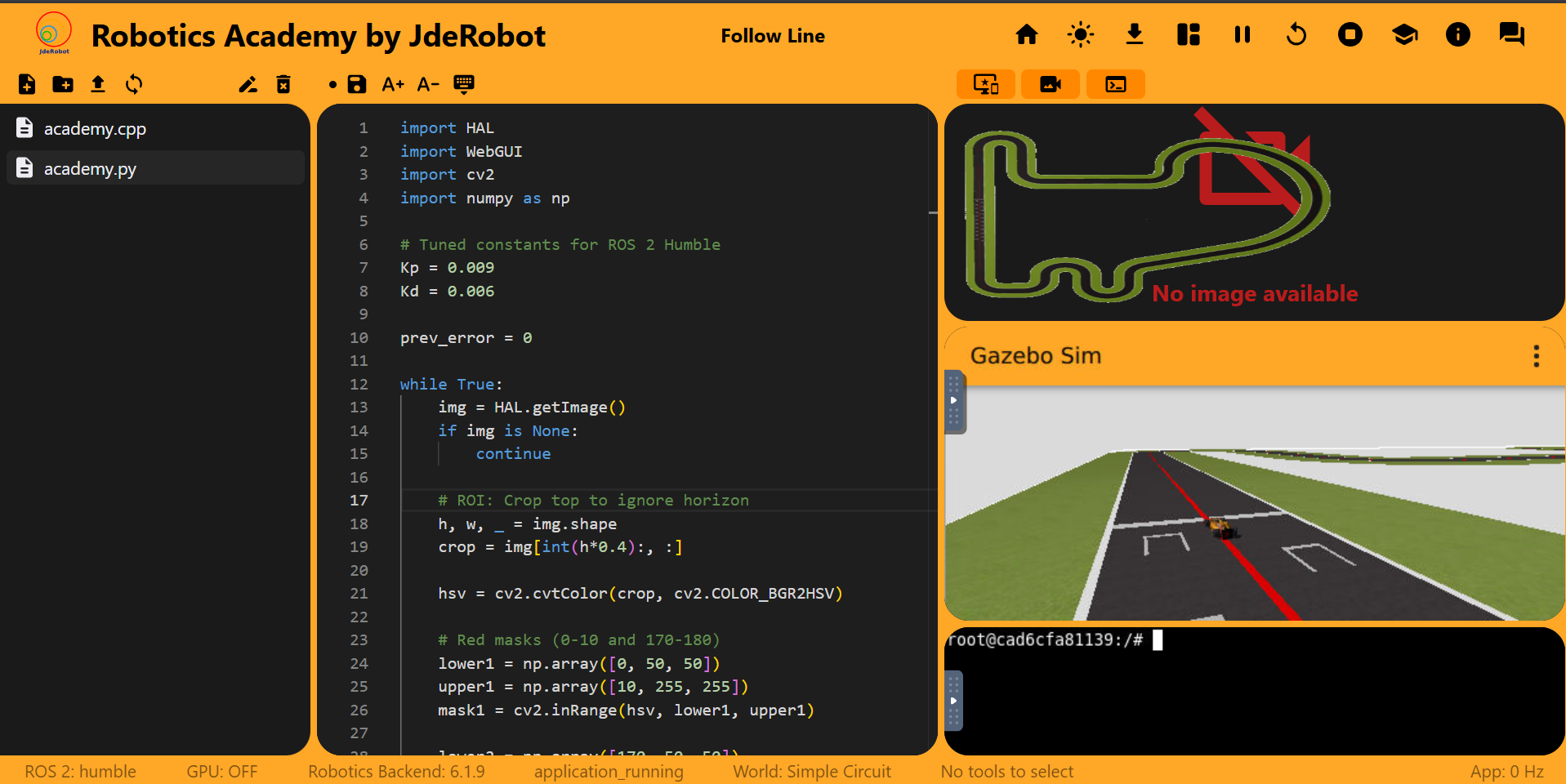
<p><img src="/gsoc2026-Kartik_Jangid/assets/images/week%2010/The%20image%20problem%20.png" alt="The camera widget showing &quot;No image available&quot; when running the Follow Line exercise" /></p>

<p>The camera widget was reporting “No image available” (and <code class="language-plaintext highlighter-rouge">HAL.getImage()</code> returned <code class="language-plaintext highlighter-rouge">None</code>). I initially thought this might be a GPU passthrough issue, but it occurred on CPU as well.</p>

<p>The root cause was a code version mismatch. The local repo was updated to include namespace prefixes in ROS2 topics (e.g., <code class="language-plaintext highlighter-rouge">/f1/camera/image_raw</code>), but the Docker image was built before this rename. Since the compose files did not bind-mount the <code class="language-plaintext highlighter-rouge">RoboticsInfrastructure</code> submodule, the built-in Gazebo models were publishing to the old topic names while the local Python code listened to the new names.</p>

<h3 id="gpu-validation-outcomes">GPU Validation Outcomes</h3>
<p>Despite the issues, I proved GPU passthrough works under rootless Podman. Running <code class="language-plaintext highlighter-rouge">vglrun glxinfo</code> inside the container correctly reported the NVIDIA GTX 1650. This offloads the 3D rendering workload and reduces CPU overhead.</p>

<p><img src="/gsoc2026-Kartik_Jangid/assets/images/week%2010/GPU%20passthrough%20proof.png" alt="Terminal output from glxinfo showing the NVIDIA GTX 1650 successfully detected inside the Podman container" /></p>

<p>Here are recordings of the Follow Line exercise running with both configurations:</p>
<ul>
  <li><a href="https://youtu.be/-wYg1roic78">GPU Accelerated Follow Line</a></li>
  <li><a href="https://youtu.be/nF5YGB5dn00">CPU Accelerated Follow Line</a></li>
</ul>

<h2 id="whats-next">What’s Next</h2>

<p>The next focus is solving the “Error saving file” bug from Week 8. I also need to find a solid workaround to stop Podman containers gracefully, similar to Docker, since the forceful terminations currently break the environment.</p>]]></content><author><name>Kartik Jangid</name></author><category term="gsoc" /><category term="coding-period" /><category term="docker" /><category term="gsoc2026" /><category term="jderobot" /><category term="podman" /><category term="rootless" /><category term="docker-compose" /><summary type="html"><![CDATA[This week I focused on testing and debugging the migration of RoboticsAcademy to rootless Podman, while enabling GPU acceleration via CDI (Container Device Interface).]]></summary></entry><entry><title type="html">Coding Week 8 — Podman Compose Testing</title><link href="https://theroboticsclub.github.io/gsoc2026-Kartik_Jangid/gsoc/coding-period/coding-week-8/" rel="alternate" type="text/html" title="Coding Week 8 — Podman Compose Testing" /><published>2026-07-16T00:00:00+00:00</published><updated>2026-07-16T00:00:00+00:00</updated><id>https://theroboticsclub.github.io/gsoc2026-Kartik_Jangid/gsoc/coding-period/coding-week-8</id><content type="html" xml:base="https://theroboticsclub.github.io/gsoc2026-Kartik_Jangid/gsoc/coding-period/coding-week-8/"><![CDATA[<p>This week mostly Focused on learning the podman architectures and whether or not migrating to Podman is a plausible strategy with also the conclusion of running the exercises with Podman compose.</p>

<h2 id="docker-also-works-via-rootless-then-why-not-use-it">Docker also works via rootless, then why not use it?</h2>

<p>According to official Docker docs, it also supports rootless mode, but it needs manual configuration by the end-user ,the user needs to execute the rootless setup script</p>
<div class="language-bash highlighter-rouge"><div class="highlight"><pre class="highlight"><code><span class="c"># it creates a user systemd service and a user socket</span>
dockerd-rootless-setuptool.sh <span class="nb">install</span>
</code></pre></div></div>
<p>Then enable and start the user Docker service.In short the user needs to do an additional one-time configuration step to switch from system-wide daemon to per-user daemon.The friction for this step is unnecessary and as told in last time it is not daemonless just like podman , it still works with daemon as a background service permanently.Switching to podman decreases the resource usage there is no background process unless needed. Podman natively has better security and also has Docker compatible CLI commands.Podman is better for RoboticsAcademy as it has true daemonless architecture and also has minimal setup for students/users.For Maintainers it will have fewer failures since the failures that included the daemon are no longer there.</p>

<h4 id="how-much-difference-would-there-be-with-podman-instead-of-docker">How much difference would there be with Podman instead of Docker?</h4>

<p>For most RoboticsAcademy users, very little changes. The existing workflows such as building images, running the exercises, using Compose, mounting volumes and exposing ports remain largely the same because both Docker and Podman implement the OCI container standards.</p>

<p>The differences become noticeable mainly in the following scenarios:</p>

<ul>
  <li>
    <p><strong>No need for the <code class="language-plaintext highlighter-rouge">docker</code> group.</strong> With Docker, many users add themselves to the <code class="language-plaintext highlighter-rouge">docker</code> group to avoid using <code class="language-plaintext highlighter-rouge">sudo</code>, even though Docker’s documentation warns that this effectively grants root-equivalent access. Podman avoids this entirely by running containers as the current user.</p>
  </li>
  <li>
    <p><strong>Better support for shared laboratory environments.</strong> Since Podman is rootless by default, multiple students can use containers on the same machine without requiring administrator privileges or sharing a system-wide daemon. This makes deployments on university lab machines considerably easier.</p>
  </li>
  <li>
    <p><strong>Simpler recovery for beginners.</strong> A user’s containers and images remain isolated within their own home directory. If a student wants to reset their environment, they can remove only their own Podman storage without affecting other users or requiring privileged cleanup.</p>
  </li>
</ul>

<p>From a maintainer’s perspective, the migration mainly simplifies the container runtime itself rather than changing the development workflow. Existing commands and Compose files require minimal changes, while eliminating the daemon removes an entire component that previously had to be installed, managed and debugged.</p>

<p>Overall, the migration is less about introducing new functionality and more about providing a simpler and safer default environment without significantly changing how RoboticsAcademy is used. How much difference would be there with Podman instead of Docker?</p>

<h2 id="current-status-of-the-podman-migration-testing-">Current Status of the Podman Migration testing :</h2>

<p>Mentor’s ask was narrow: get the RoboticsAcademy image building and running under Podman, no GPU required for this pass, and call it a success if the image compiles and one exercise launches inside RA. Performance, the full exercise catalog, and GPU support were explicitly out of scope for this round.</p>

<h3 id="getting-the-full-stack-up">Getting the Full Stack Up</h3>

<p>A standalone container is one thing, a compose stack is another. Two things had to be sorted before <code class="language-plaintext highlighter-rouge">docker-compose</code> running against the Podman backend would even attempt to bring the stack up.</p>

<p>First, Podman doesn’t run a background daemon by default, so compose had nothing to talk to until I started the API socket: <code class="language-plaintext highlighter-rouge">systemctl --user start podman.socket</code>, enabled for persistence afterward.</p>

<p>Second, the compose file I was testing with requested an NVIDIA device reservation and <code class="language-plaintext highlighter-rouge">/dev/dri</code> access, which Podman couldn’t interpret and wasn’t needed for this pass anyway. Made a GPU-free copy, <code class="language-plaintext highlighter-rouge">dev-test-compose.podman.yaml</code>, for the test.</p>

<p>Third, Podman keeps its own image store, separate from Docker’s. The images built in last week’s Podman test weren’t visible to compose under the names it expected, <code class="language-plaintext highlighter-rouge">jderobot/robotics-academy:test</code> and <code class="language-plaintext highlighter-rouge">jderobot/robotics-database:latest</code>, until I retagged them.</p>

<p>With both sorted, the stack came up clean, database <code class="language-plaintext highlighter-rouge">healthy</code>, app <code class="language-plaintext highlighter-rouge">Up</code>.</p>

<h3 id="stale-checkouts-across-three-repos">Stale Checkouts Across Three Repos</h3>

<p>Getting an exercise to actually load turned into the most confusing part of the week, and none of it was Podman’s fault .I just hadn’t pulled the latest commits across three different repos, all renamed the same day, July 7th, as part of one coordinated cleanup.</p>

<p>The frontend bundle was still calling <code class="language-plaintext highlighter-rouge">get_universes_list</code>, renamed to <code class="language-plaintext highlighter-rouge">get_worlds_list</code>, fixed with <code class="language-plaintext highlighter-rouge">yarn install &amp;&amp; yarn run build</code>. The <code class="language-plaintext highlighter-rouge">RoboticsInfrastructure</code> submodule had renamed <code class="language-plaintext highlighter-rouge">universes.sql</code> to <code class="language-plaintext highlighter-rouge">worlds.sql</code>, breaking a bind mount, fixed with a one-line path change (the same stale reference is still in the tracked compose files under <code class="language-plaintext highlighter-rouge">compose_cfg/</code> on <code class="language-plaintext highlighter-rouge">humble-devel</code>). And <code class="language-plaintext highlighter-rouge">src/</code>, a separate nested clone of <code class="language-plaintext highlighter-rouge">RoboticsApplicationManager</code> about 35 commits behind its upstream, had renamed <code class="language-plaintext highlighter-rouge">world</code> to <code class="language-plaintext highlighter-rouge">scene</code> in the frontend-backend message format, throwing <code class="language-plaintext highlighter-rouge">KeyError: 'world'</code>, fixed with a <code class="language-plaintext highlighter-rouge">git pull</code>.</p>

<p>Once all three were current, <code class="language-plaintext highlighter-rouge">follow_line</code> launched end to end, noVNC came up, the simulation loaded, and running the exercise’s code got a response from the robot.</p>

<h3 id="a-real-podman-difference-chmod-fails-on-root-owned-files">A Real Podman Difference: chmod Fails on Root-Owned Files</h3>

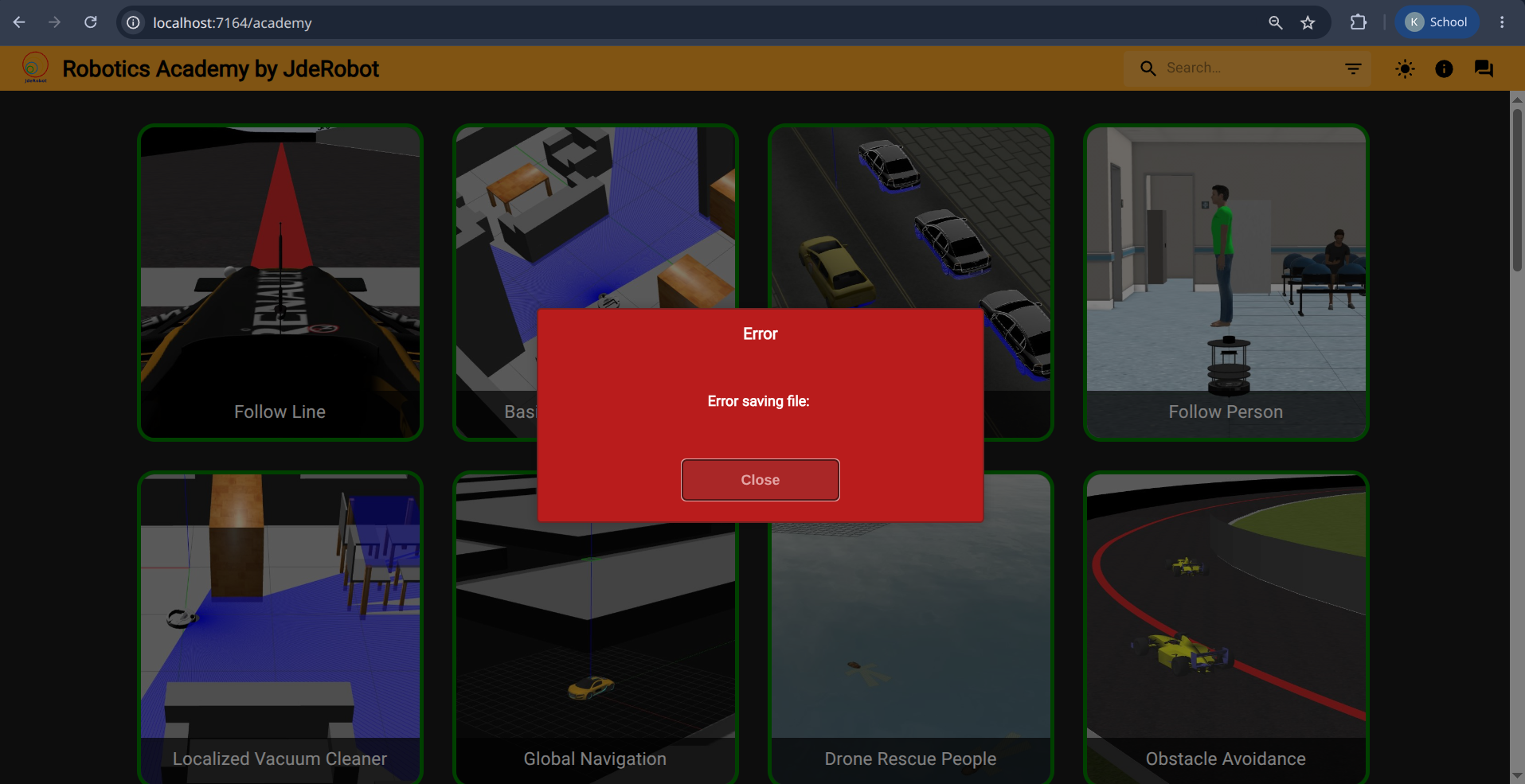
<p>Autosave, the save that fires automatically when leaving an exercise’s editor, threw an “Error saving file:” popup with no message attached. This one was worth tracing properly rather than shrugging off.</p>

<p><img src="/gsoc2026-Kartik_Jangid/assets/images/week8/Error%20podman.png" alt="Error saving file popup with no message, shown while testing autosave on the Follow Line exercise" /></p>

<p>Turned out the save itself worked. The file’s new content wrote to disk without a problem. What failed was the step right after it, an attempt to reset the file’s permissions back to fully open, and that failure is what surfaced as the error.</p>

<p>The reason traces back to how this particular file came to exist. It’s a per-student workspace file, <code class="language-plaintext highlighter-rouge">filesystem/follow_line/academy.py</code>, that RoboticsAcademy creates the first time an exercise gets opened, and this one had been sitting around since May, created weeks earlier while testing with plain rootful Docker, whose containers run as genuine root on the host. Rootless Podman doesn’t work that way by design. Its container’s “root” is really just the local user wearing a disguise, so it could still write new content into a file it doesn’t own, but it couldn’t change that file’s permission bits, since that specifically requires real ownership. The error code confirmed exactly this: <code class="language-plaintext highlighter-rouge">EPERM</code>, not the more familiar <code class="language-plaintext highlighter-rouge">EACCES</code>, the standard signature of an ownership mismatch rather than a plain access problem.</p>

<p>Nothing was lost. The edit itself saved, only the permission reset failed, and the popup came back blank because of a separate, preexisting bug where the frontend only reads error text from one field while this class of backend error sends it under another. Unrelated to Podman, and it would hide the same message under regular Docker too.</p>

<h3 id="result">Result</h3>

<p>The full stack ran under Podman, <code class="language-plaintext highlighter-rouge">follow_line</code> launched, and the simulation responded to code, which was the whole goal for this round. Everything that got there outside the codebase itself: two one-time host/Podman config changes, one scratch GPU-free compose file, three unrelated stale checkouts pulled up to date, and one genuine, reproducible Podman-vs-Docker behavior difference around rootless UID handling on legacy root-owned files.</p>

<h2 id="whats-next">What’s Next</h2>

<p>Testing if the podman works with the GPU enabled which is the main pain-point of using podman
<em>Part of my GSoC 2026 work with JdeRobot. Project tracked at <a href="https://github.com/TheRoboticsClub/gsoc2026-Kartik_Jangid">github.com/TheRoboticsClub/gsoc2026-Kartik_Jangid</a>.</em></p>]]></content><author><name>Kartik Jangid</name></author><category term="gsoc" /><category term="coding-period" /><category term="docker" /><category term="gsoc2026" /><category term="jderobot" /><category term="podman" /><category term="rootless" /><category term="docker-compose" /><summary type="html"><![CDATA[This week mostly Focused on learning the podman architectures and whether or not migrating to Podman is a plausible strategy with also the conclusion of running the exercises with Podman compose.]]></summary></entry><entry><title type="html">Coding Week 9 — Podman GPU Passthrough</title><link href="https://theroboticsclub.github.io/gsoc2026-Kartik_Jangid/gsoc/coding-period/coding-week-9/" rel="alternate" type="text/html" title="Coding Week 9 — Podman GPU Passthrough" /><published>2026-07-16T00:00:00+00:00</published><updated>2026-07-16T00:00:00+00:00</updated><id>https://theroboticsclub.github.io/gsoc2026-Kartik_Jangid/gsoc/coding-period/coding-week-9</id><content type="html" xml:base="https://theroboticsclub.github.io/gsoc2026-Kartik_Jangid/gsoc/coding-period/coding-week-9/"><![CDATA[<p>This week I focused on getting the image running with Podman and GPU support, then narrowing down why the GPU path failed and what the next fix should be.</p>

<h2 id="docker-vs-podman-gpu-pass-through">Docker vs Podman GPU pass-through</h2>
<p>As noted in the previous week’s blog, Podman is daemonless, so the GPU setup has to happen through CDI instead of a rootful runtime hook. With NVIDIA, CDI is what tells Podman which device to expose and which driver libraries to mount; without those libraries, the container would see the device but would not render correctly.</p>

<h2 id="uidgid-and-rootless">UID/GID and rootless</h2>
<p>Since rootless Podman maps the container’s root back to my unprivileged host user, the process inside the container can still fail on a host device file if the UID or GID does not line up. The GPU render node on the host is owned by group <code class="language-plaintext highlighter-rouge">render</code>, so if the container does not get the right group access the GPU gets denied and quietly falls back to CPU rendering. <code class="language-plaintext highlighter-rouge">keep-id</code> keeps the user mapping aligned, and CDI injects the render/video group access automatically, so no extra group setup was needed. On my machine this currently works only because my desktop login grants temporary access to the GPU device; that will not exist on a server.</p>

<h2 id="problems-and-their-solutions">Problems and their solutions</h2>

<h3 id="the-blocker-an-outdated-podman-i-forgot-to-update">The blocker: an outdated podman I forgot to update</h3>
<p>This one was my own mistake, I hadn’t kept podman updated. When two tools that share a file drift apart in version, one writes something the other can’t read. Here <code class="language-plaintext highlighter-rouge">nvidia-ctk</code> (which generates the CDI spec) wrote a newer field, <code class="language-plaintext highlighter-rouge">additionalGids</code>, that my older podman’s parser doesn’t recognize. Instead of ignoring the unknown field, the parser rejects the entire spec (<code class="language-plaintext highlighter-rouge">json: unknown field "additionalGids"</code>) → 0 devices found → no GPU. This happens before compose is even involved, so compose would hit the same wall.</p>

<p>It’s not only my mistake though. Ubuntu 24.04 ships podman 4.9.3 in its repositories and that’s the ceiling, so a plain <code class="language-plaintext highlighter-rouge">apt upgrade</code> won’t move past it. Any student following the default install path on Ubuntu 24.04 would hit this exact wall, which makes updating podman a real prerequisite for the project and not just something I overlooked.</p>

<p>The fix is to update Podman so its parser understands the newer spec. I also found that my own <code class="language-plaintext highlighter-rouge">containers.conf</code> was overriding Podman’s built-in CDI paths with a personal one, which made this work only because of a leftover debugging file from the version mismatch. Removing that override left GPU passthrough working the same way, but now on the paths a fresh install already has; <code class="language-plaintext highlighter-rouge">~/.config/cdi</code> also held two conflicting spec files, which I cleared as part of the same fix.</p>

<h3 id="which-compose-engine-to-use">Which compose engine to use</h3>
<p>There are two “podman compose” tools and they don’t behave the same. <code class="language-plaintext highlighter-rouge">podman compose</code> (which delegates to docker-compose) mangles <code class="language-plaintext highlighter-rouge">nvidia.com/gpu=all</code> into a plain bind-mount and needs the podman socket, which is disabled in rootless. The Python <code class="language-plaintext highlighter-rouge">podman-compose</code> forwards <code class="language-plaintext highlighter-rouge">--device nvidia.com/gpu=all</code> to podman untouched, so that’s the engine I’ll use.
I also hit a PATH issue inside <code class="language-plaintext highlighter-rouge">podman-compose</code>, where it was resolving the wrong helper binary at first, so the same stale-tooling pattern showed up twice before the stack would start.
I also hit a PATH issue inside <code class="language-plaintext highlighter-rouge">podman-compose</code>, where it was resolving the wrong helper binary at first, so the same stale-tooling pattern showed up twice before the stack would start.</p>

<h3 id="nvidia-environment-variables">NVIDIA environment variables</h3>
<p><code class="language-plaintext highlighter-rouge">NVIDIA_DRIVER_CAPABILITIES</code> stays, it controls which graphics libraries get mounted. <code class="language-plaintext highlighter-rouge">NVIDIA_VISIBLE_DEVICES</code> is dropped as a GPU selector here: it belongs to the old runtime-hook mechanism, and in CDI mode the device is chosen by its CDI name instead.</p>

<h2 id="extra-read--compose-file-duplication">Extra read — compose file duplication</h2>
<p>Right now the compose_cfg contains 8 compose files which are mostly identical-every combination of {user, dev} × {cpu, gpu, nvidia, nvidia-windows}.One change needs to be replicated in all other files. I can put base code into one file and put the actual difference(GPU bits) into small override fragments I layer on top.base + nvidia-override, base + intel-override, base + nothing for CPU.</p>

<h2 id="conclusion">Conclusion</h2>
<p>The path forward is CDI-based GPU passthrough run through Python <code class="language-plaintext highlighter-rouge">podman-compose</code>, with keep-id and keep-groups handling rootless identity.</p>]]></content><author><name>Kartik Jangid</name></author><category term="gsoc" /><category term="coding-period" /><category term="docker" /><category term="gsoc2026" /><category term="jderobot" /><category term="podman" /><category term="rootless" /><category term="docker-compose" /><summary type="html"><![CDATA[This week I focused on getting the image running with Podman and GPU support, then narrowing down why the GPU path failed and what the next fix should be.]]></summary></entry><entry><title type="html">Coding Week 7 — Dependency Fixes, First Podman Build</title><link href="https://theroboticsclub.github.io/gsoc2026-Kartik_Jangid/gsoc/coding-period/coding-week-7/" rel="alternate" type="text/html" title="Coding Week 7 — Dependency Fixes, First Podman Build" /><published>2026-07-09T00:00:00+00:00</published><updated>2026-07-09T00:00:00+00:00</updated><id>https://theroboticsclub.github.io/gsoc2026-Kartik_Jangid/gsoc/coding-period/coding-week-7</id><content type="html" xml:base="https://theroboticsclub.github.io/gsoc2026-Kartik_Jangid/gsoc/coding-period/coding-week-7/"><![CDATA[<p>Half-week post — mentor review reopened two things in the split, and the rest went into a first Podman build test.</p>

<h2 id="dependency-fixes-from-mentor-review">Dependency Fixes from Mentor Review</h2>

<p>Mentor review on the split: 11.9GB to 10.7GB didn’t justify the added complexity, and clean build time roughly doubled — 20 to 40 minutes — since <code class="language-plaintext highlighter-rouge">deps-final</code> keeps the full ROS toolchain, paying colcon’s cost twice. Also flagged: the narrow <code class="language-plaintext highlighter-rouge">/usr/local</code> COPY from the size-regression fix had silently broken OMPL’s Python bindings and <code class="language-plaintext highlighter-rouge">pg_dump</code>.</p>

<p>OMPL’s bindings install via <code class="language-plaintext highlighter-rouge">install-ompl-ubuntu.sh --python</code> into <code class="language-plaintext highlighter-rouge">/usr/lib/python3/dist-packages/ompl/</code>, not <code class="language-plaintext highlighter-rouge">/usr/local</code>, so that COPY missed them — fixed with one more explicit COPY at <code class="language-plaintext highlighter-rouge">Dockerfile.dependencies_humble:598</code>.</p>

<p><code class="language-plaintext highlighter-rouge">pg_dump</code> was missing outright: <code class="language-plaintext highlighter-rouge">deps-final</code> only had <code class="language-plaintext highlighter-rouge">libpq5</code>, and the admin section’s <code class="language-plaintext highlighter-rouge">save_exercise_db</code>/<code class="language-plaintext highlighter-rouge">save_universe_db</code> views call it directly. Added <code class="language-plaintext highlighter-rouge">postgresql-client-18</code> at line 463, pinned because the database container runs Postgres 18 and <code class="language-plaintext highlighter-rouge">pg_dump</code> won’t dump a newer server than itself.</p>

<p>That surfaced a second bug: <code class="language-plaintext highlighter-rouge">deps-final</code> had PGDG’s source copied in before <code class="language-plaintext highlighter-rouge">ca-certificates</code> existed, so the HTTPS fetch to <code class="language-plaintext highlighter-rouge">apt.postgresql.org</code> failed. Fixed with a <code class="language-plaintext highlighter-rouge">ca-certificates</code>-only install at line 414, ahead of the PGDG COPY, matching <code class="language-plaintext highlighter-rouge">deps-builder</code>’s order.</p>

<p>Verified both directly: imported OMPL’s bindings, ran <code class="language-plaintext highlighter-rouge">pg_dump</code> against a live Postgres 18 container. Net size: 9.55GB, up slightly from 9.49GB before these fixes.</p>

<h2 id="first-podman-build">First Podman Build</h2>

<p>Set up a <code class="language-plaintext highlighter-rouge">podman-compat-test</code> branch off <code class="language-plaintext highlighter-rouge">humble-devel</code> with the original Dockerfiles, kept separate from the refactor so results don’t mix. First failure: <code class="language-plaintext highlighter-rouge">Dockerfile.dependencies_humble</code>’s <code class="language-plaintext highlighter-rouge">FROM</code> line — <code class="language-plaintext highlighter-rouge">nvidia/opengl:1.2-glvnd-runtime-ubuntu22.04</code> is an unqualified image name, and Podman won’t assume Docker Hub for those the way Docker does.</p>

<p>There were two ways to fix this. One was fully qualifying the reference in the Dockerfile itself, <code class="language-plaintext highlighter-rouge">docker.io/nvidia/opengl:1.2-glvnd-runtime-ubuntu22.04</code> — no config changes, but it means editing the file, and the point of this branch was testing the original Dockerfiles unmodified. The other was configuring a default search registry on the Podman side, which doesn’t touch the Dockerfile at all: adding <code class="language-plaintext highlighter-rouge">unqualified-search-registries = ["docker.io"]</code> to <code class="language-plaintext highlighter-rouge">~/.config/containers/registries.conf</code>. Rootless Podman reads that file before the system-wide <code class="language-plaintext highlighter-rouge">/etc/containers/registries.conf</code>, so it doesn’t need sudo either. I went with the registry config for this test, since keeping the Dockerfile untouched was the whole point. Worth noting for later, though, fully qualifying the image reference is probably the better fix for the actual codebase, since it means anyone building this under Podman doesn’t need to know about registry config at all. That’s a small, separate change I’d want to raise once this testing phase moves further.</p>

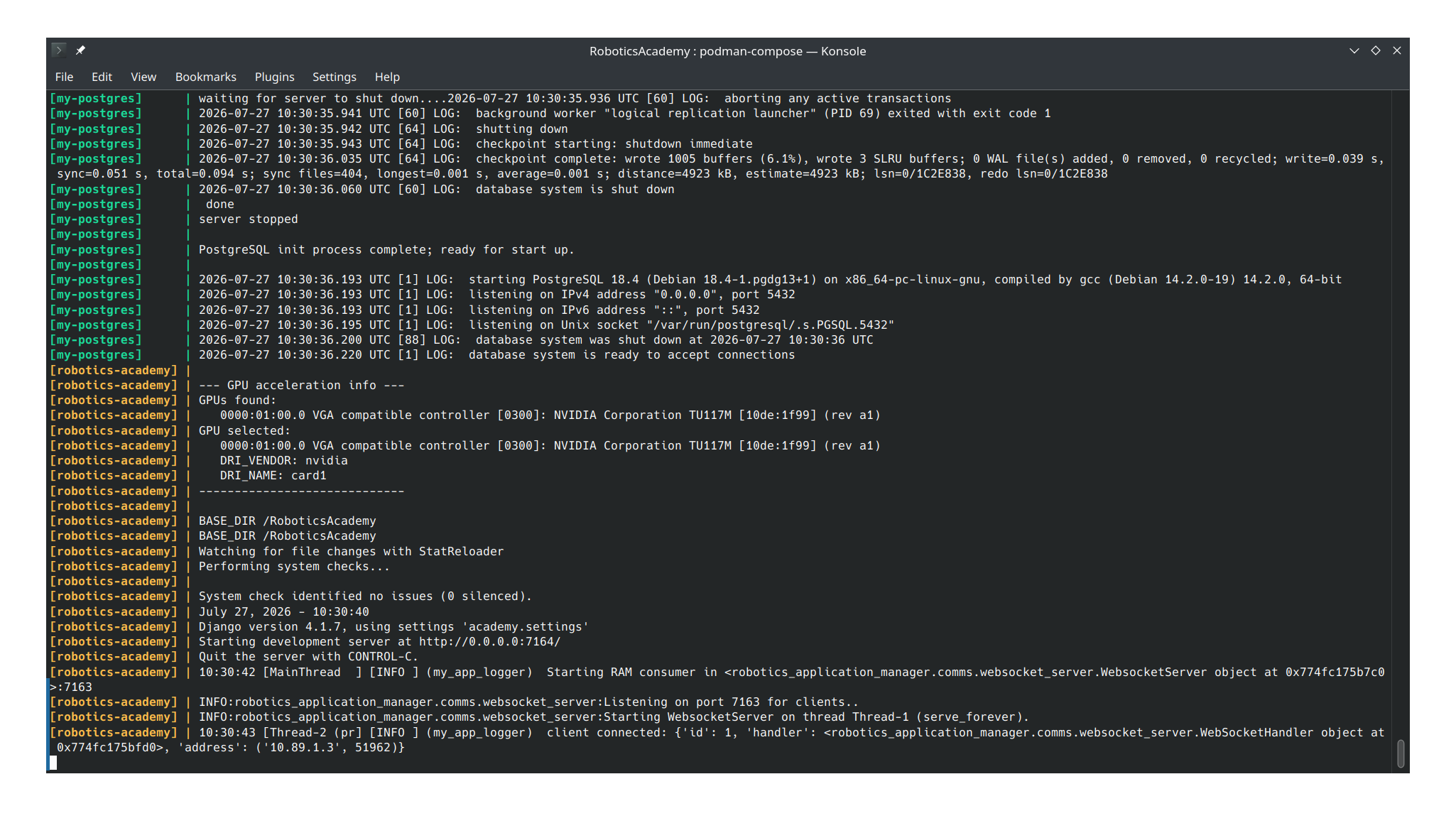
<p>After that, both Dockerfiles built clean under Podman unmodified — 26 workspace packages compiled. Running it standalone, GPU detection found nothing and fell back to CPU-only without crashing (no GPU needed for this pass), and Django plus the RAM manager’s websocket server both started. The only error was Django failing to reach a nonexistent database host — expected in a standalone run, same as plain Docker with no DB present.</p>

<p><img src="/gsoc2026-Kartik_Jangid/assets/images/week7/podman_run_1st.png" alt="podman run of the built dependencies image, showing a clean start with no GPU" /></p>

<p>Next is the full compose stack under Podman. The compose file requests GPU reservations Podman can’t interpret, so I’m preparing a GPU-free variant — then the goal is launching one exercise inside RA to confirm end-to-end compatibility.</p>

<p><em>Part of my GSoC 2026 work with JdeRobot. Project tracked at <a href="https://github.com/TheRoboticsClub/gsoc2026-Kartik_Jangid">github.com/TheRoboticsClub/gsoc2026-Kartik_Jangid</a>.</em></p>]]></content><author><name>Kartik Jangid</name></author><category term="gsoc" /><category term="coding-period" /><category term="docker" /><category term="gsoc2026" /><category term="jderobot" /><category term="optimization" /><category term="multi-stage-build" /><category term="ros2" /><category term="postgresql" /><category term="podman" /><summary type="html"><![CDATA[Half-week post — mentor review reopened two things in the split, and the rest went into a first Podman build test.]]></summary></entry><entry><title type="html">Coding Week 6 — First Multi-Stage Build, First Regression</title><link href="https://theroboticsclub.github.io/gsoc2026-Kartik_Jangid/gsoc/coding-period/coding-week-6/" rel="alternate" type="text/html" title="Coding Week 6 — First Multi-Stage Build, First Regression" /><published>2026-07-05T00:00:00+00:00</published><updated>2026-07-05T00:00:00+00:00</updated><id>https://theroboticsclub.github.io/gsoc2026-Kartik_Jangid/gsoc/coding-period/coding-week-6</id><content type="html" xml:base="https://theroboticsclub.github.io/gsoc2026-Kartik_Jangid/gsoc/coding-period/coding-week-6/"><![CDATA[<p>The goal this week was to actually build the multi-stage split I designed last week: turn <code class="language-plaintext highlighter-rouge">Dockerfile.dependencies_humble</code> into two stages, a <code class="language-plaintext highlighter-rouge">deps-builder</code> and a <code class="language-plaintext highlighter-rouge">deps-final</code>, without changing how either ROS workspace compiles. No touching colcon invocations, no touching <code class="language-plaintext highlighter-rouge">--symlink-install</code>. The code for all of this is in <a href="https://github.com/JdeRobot/RoboticsAcademy/pull/3900">PR #3900</a>, if you want to see the actual diff for the stages described below.</p>

<p>I worked in a .multistage copy of the file the entire time, leaving Dockerfile.dependencies_humble itself untouched until the split was fully verified — safer to break a throwaway file fifty times over than the one file everyone else’s builds actually depend on.</p>

<h2 id="skeleton-first">Skeleton First</h2>

<p>First pass was just the skeleton. <code class="language-plaintext highlighter-rouge">deps-final</code> did a wholesale <code class="language-plaintext highlighter-rouge">COPY --from=deps-builder / /</code>, and I went through every <code class="language-plaintext highlighter-rouge">ENV</code>, <code class="language-plaintext highlighter-rouge">WORKDIR</code>, and <code class="language-plaintext highlighter-rouge">ARG</code> by hand to make sure each one carried across the stage boundary correctly. It did. Then I built <code class="language-plaintext highlighter-rouge">Dockerfile.humble</code> unedited on top of that image and ran it through the full smoke test — Django, the RAM websocket, noVNC once an exercise launches, an <code class="language-plaintext highlighter-rouge">ldd</code> sweep across the compiled workspace libraries. Everything came back clean, so the boundary itself wasn’t the problem, which was a good place to start before touching anything else.</p>

<h2 id="the-toolchain-question">The Toolchain Question</h2>

<p><code class="language-plaintext highlighter-rouge">Dockerfile.humble</code> runs its own <code class="language-plaintext highlighter-rouge">colcon build</code> on top of this image to compile <code class="language-plaintext highlighter-rouge">CustomRobots</code>, <code class="language-plaintext highlighter-rouge">jderobot_drones</code>, <code class="language-plaintext highlighter-rouge">Industrial</code>, and <code class="language-plaintext highlighter-rouge">common_interfaces_cpp</code>, which get moved into <code class="language-plaintext highlighter-rouge">/home/ws/src/</code> a few lines earlier. That one call site means <code class="language-plaintext highlighter-rouge">deps-final</code> can’t be a stripped-down runtime image — it has to keep the full ROS build toolchain. I ran that by the mentor before dropping anything, since getting it wrong would mean a broken downstream build with a confusing error months from now.</p>

<p>So the trimming ended up narrower than I’d planned. Tracing through <code class="language-plaintext highlighter-rouge">entrypoint.sh</code>, <code class="language-plaintext highlighter-rouge">manager.py</code>, and the launcher scripts for anything that actually runs at boot or exercise-launch time turned up <code class="language-plaintext highlighter-rouge">tmux</code> and <code class="language-plaintext highlighter-rouge">tmuxinator</code> with zero invocations anywhere, just a leftover bash-completion stub. <code class="language-plaintext highlighter-rouge">postgresql-18</code> became <code class="language-plaintext highlighter-rouge">libpq5</code> once I confirmed the Postgres server binary itself never starts inside this image — only <code class="language-plaintext highlighter-rouge">psycopg2</code> needs the client library to link against.</p>

<p>The harder calls needed more than a grep. I ran <code class="language-plaintext highlighter-rouge">ldd</code> across every compiled binary in the image, matched each shared library back to its apt package with <code class="language-plaintext highlighter-rouge">dpkg -S</code>, and checked every pip package against real <code class="language-plaintext highlighter-rouge">import</code> statements in the codebase. Two of those checks went against what I expected going in. <code class="language-plaintext highlighter-rouge">onnxruntime-gpu</code> and its CUDA wheels showed no <code class="language-plaintext highlighter-rouge">ldd</code> or import evidence anywhere, but three exercise templates compile against onnxruntime’s C++ API at load time — nothing static analysis would ever catch, so it stays. And <code class="language-plaintext highlighter-rouge">pylint</code>, <code class="language-plaintext highlighter-rouge">black</code>, and <code class="language-plaintext highlighter-rouge">jedi</code>, which I’d have called dev tooling on sight, turned out to be declared runtime dependencies of the RAM’s web IDE in its <code class="language-plaintext highlighter-rouge">pyproject.toml</code>.</p>

<h2 id="the-regression">The Regression</h2>

<p>The first full <code class="language-plaintext highlighter-rouge">deps-final</code> build came out bigger than the original single-stage image, which is the opposite of the entire point. <code class="language-plaintext highlighter-rouge">docker history</code> and <code class="language-plaintext highlighter-rouge">dive</code>’s wasted-space report pointed at a blanket <code class="language-plaintext highlighter-rouge">COPY --from=deps-builder /usr/local/ /usr/local/</code> — it was dragging across roughly 3.5GB that five separate pip <code class="language-plaintext highlighter-rouge">RUN</code> blocks in that same stage were already reinstalling from scratch. I swapped it for a handful of explicit <code class="language-plaintext highlighter-rouge">COPY</code> lines that only pull the non-pip content actually living under <code class="language-plaintext highlighter-rouge">/usr/local</code>: OMPL and onnxruntime’s compiled C++ libraries, about 40MB total.</p>

<p>A second, unrelated break showed up downstream. Folding <code class="language-plaintext highlighter-rouge">lxde-common</code> into a consolidated <code class="language-plaintext highlighter-rouge">--no-install-recommends</code> apt block silently dropped the two packages it normally pulls in with it, <code class="language-plaintext highlighter-rouge">lxde-core</code> and <code class="language-plaintext highlighter-rouge">openbox-lxde-session</code> — and <code class="language-plaintext highlighter-rouge">Dockerfile.humble</code> needs those to place <code class="language-plaintext highlighter-rouge">rc.xml</code> into a directory only they create. Putting <code class="language-plaintext highlighter-rouge">lxde-common</code> back on its own unflagged line, the way the original file already had it, fixed the build.</p>

<h2 id="where-this-landed">Where This Landed</h2>

<p>I rebuilt both versions the same day for a fair comparison: the original single-stage image is 11.9GB, <code class="language-plaintext highlighter-rouge">deps-final</code> comes in at 10.7GB. Checked that with <code class="language-plaintext highlighter-rouge">docker history</code>, another <code class="language-plaintext highlighter-rouge">ldd</code> sweep across both workspaces, and a full pass through <code class="language-plaintext highlighter-rouge">docker compose</code> — Django routes, DB-backed queries, the RAM websocket handshake, clean shutdown. The split holds together and it’s smaller, which was the actual goal for the week.</p>

<h2 id="still-open">Still Open</h2>

<p>Loading an exercise through <code class="language-plaintext highlighter-rouge">docker compose</code> throws <code class="language-plaintext highlighter-rouge">relation "exercises" does not exist</code>, even though Postgres itself reports healthy. I don’t yet know if that’s a stale data volume left over from earlier test runs or something in how the init SQL files get loaded — that’s what I’m chasing next.</p>

<p><em>Part of my GSoC 2026 work with JdeRobot. Project tracked at <a href="https://github.com/TheRoboticsClub/gsoc2026-Kartik_Jangid">github.com/TheRoboticsClub/gsoc2026-Kartik_Jangid</a>.</em></p>]]></content><author><name>Kartik Jangid</name></author><category term="gsoc" /><category term="coding-period" /><category term="docker" /><category term="gsoc2026" /><category term="jderobot" /><category term="optimization" /><category term="multi-stage-build" /><category term="ros2" /><summary type="html"><![CDATA[The goal this week was to actually build the multi-stage split I designed last week: turn Dockerfile.dependencies_humble into two stages, a deps-builder and a deps-final, without changing how either ROS workspace compiles. No touching colcon invocations, no touching --symlink-install. The code for all of this is in PR #3900, if you want to see the actual diff for the stages described below.]]></summary></entry><entry><title type="html">Coding Week 5 — Two Fixes and a Refactor Plan</title><link href="https://theroboticsclub.github.io/gsoc2026-Kartik_Jangid/gsoc/coding-period/coding-week-5/" rel="alternate" type="text/html" title="Coding Week 5 — Two Fixes and a Refactor Plan" /><published>2026-06-28T00:00:00+00:00</published><updated>2026-06-28T00:00:00+00:00</updated><id>https://theroboticsclub.github.io/gsoc2026-Kartik_Jangid/gsoc/coding-period/coding-week-5</id><content type="html" xml:base="https://theroboticsclub.github.io/gsoc2026-Kartik_Jangid/gsoc/coding-period/coding-week-5/"><![CDATA[<p>Semester exams and VIVAs ran through most of the week, so there wasn’t much time to work. We only had the Monday meeting — I told David up front that I wouldn’t get much done, and we skipped Thursday’s. Two things still shipped.</p>

<h2 id="the-nvidia-fix-pr-3890">The NVIDIA Fix (<a href="https://github.com/JdeRobot/RoboticsAcademy/pull/3890">PR #3890</a>)</h2>

<p><code class="language-plaintext highlighter-rouge">Dockerfile.dependencies_humble</code> had this near the top:</p>

<div class="language-plaintext highlighter-rouge"><div class="highlight"><pre class="highlight"><code>ARG NVIDIA_VISIBLE_DEVICES=all
ENV NVIDIA_DRIVER_CAPABILITIES=all
</code></pre></div></div>

<p><code class="language-plaintext highlighter-rouge">ARG</code> variables exist only during the build — not written into any image layer, so the running container never sees them. <code class="language-plaintext highlighter-rouge">NVIDIA_VISIBLE_DEVICES</code> controls which GPUs the NVIDIA container runtime exposes. Setting it as <code class="language-plaintext highlighter-rouge">ARG</code> meant GPU visibility was silently broken at runtime. No error, no warning, just no GPUs. Changed to <code class="language-plaintext highlighter-rouge">ENV</code>.</p>

<p>The second fix: <code class="language-plaintext highlighter-rouge">Dockerfile.humble</code> had a standalone <code class="language-plaintext highlighter-rouge">source</code> call in its own <code class="language-plaintext highlighter-rouge">RUN</code> instruction before the <code class="language-plaintext highlighter-rouge">colcon build</code>. Docker starts a new shell for each <code class="language-plaintext highlighter-rouge">RUN</code>, so the sourced environment was gone before the next line ran. Dead line. Removed it.</p>

<p>Both fixes are one PR — small, isolated, and reviewable without touching the refactor.</p>

<h2 id="the-refactor-plan">The Refactor Plan</h2>

<p>Before touching any Dockerfile I wrote out the full multi-stage split as a design document. At this scale — two images, each with its own builder/runtime boundary, one <code class="language-plaintext highlighter-rouge">FROM</code> the other — getting the COPY boundaries wrong in code means broken container runs that are slow to diagnose. The structure: <code class="language-plaintext highlighter-rouge">Dockerfile.dependencies_humble</code> gets a builder that runs the full Aerostack2 build and a slim runtime that receives only the compiled artifacts. <code class="language-plaintext highlighter-rouge">Dockerfile.humble</code> chains off that slim runtime, adds its own builder to compile <code class="language-plaintext highlighter-rouge">/home/ws/</code>, and produces the shipped image.</p>

<p>The key finding that changed what gets <code class="language-plaintext highlighter-rouge">COPY --from</code>‘d came from the <code class="language-plaintext highlighter-rouge">--symlink-install</code> verification done in Week 4. The assumption was that it writes <code class="language-plaintext highlighter-rouge">.pth</code> files for Python packages, meaning only a few small <code class="language-plaintext highlighter-rouge">src/</code> directories would need to travel with <code class="language-plaintext highlighter-rouge">install/</code>. Running <code class="language-plaintext highlighter-rouge">find</code> inside both images returned zero <code class="language-plaintext highlighter-rouge">.pth</code> files. What <code class="language-plaintext highlighter-rouge">--symlink-install</code> actually produces is filesystem symlinks — 3,206 from <code class="language-plaintext highlighter-rouge">/home/ws/install/</code> back into <code class="language-plaintext highlighter-rouge">/home/ws/src/</code>, and 347 from <code class="language-plaintext highlighter-rouge">/home/drones_ws/install/</code> back into <code class="language-plaintext highlighter-rouge">/home/drones_ws/src/</code>. Copying <code class="language-plaintext highlighter-rouge">install/</code> alone into the runtime stage leaves all of those dangling. The minimal subset of <code class="language-plaintext highlighter-rouge">src/</code> the symlink graph requires has to be traced from the links — that question goes to the mentor before implementation starts.</p>

<p>The 83 <code class="language-plaintext highlighter-rouge">NEEDS_CLARIFICATION</code> packages from the Week 4 audit are kept as-is in the plan. Their classification needs confirmation before they can be moved or dropped.</p>

<p>The implementation is split into sequential PRs — one per Dockerfile — so each can be built and tested before the next opens.</p>

<p>Next week is implementation, starting with the builder/runtime stage skeleton for <code class="language-plaintext highlighter-rouge">Dockerfile.dependencies_humble</code>.</p>

<p><em>Part of my GSoC 2026 work with JdeRobot. Project tracked at <a href="https://github.com/TheRoboticsClub/gsoc2026-Kartik_Jangid">github.com/TheRoboticsClub/gsoc2026-Kartik_Jangid</a>.</em></p>]]></content><author><name>Kartik Jangid</name></author><category term="gsoc" /><category term="coding-period" /><category term="docker" /><category term="gsoc2026" /><category term="jderobot" /><category term="optimization" /><category term="multi-stage-build" /><category term="nvidia" /><category term="ros2" /><summary type="html"><![CDATA[Semester exams and VIVAs ran through most of the week, so there wasn’t much time to work. We only had the Monday meeting — I told David up front that I wouldn’t get much done, and we skipped Thursday’s. Two things still shipped.]]></summary></entry><entry><title type="html">Coding Week 4 — Pre-Refactoring Audit</title><link href="https://theroboticsclub.github.io/gsoc2026-Kartik_Jangid/gsoc/coding-period/coding-week-4/" rel="alternate" type="text/html" title="Coding Week 4 — Pre-Refactoring Audit" /><published>2026-06-18T00:00:00+00:00</published><updated>2026-06-18T00:00:00+00:00</updated><id>https://theroboticsclub.github.io/gsoc2026-Kartik_Jangid/gsoc/coding-period/coding-week-4</id><content type="html" xml:base="https://theroboticsclub.github.io/gsoc2026-Kartik_Jangid/gsoc/coding-period/coding-week-4/"><![CDATA[<p>I spent this week doing a structured read of the existing build system before writing any new Dockerfile. David and Javier both said it clearly: work with clarity first, ask on Slack rather than assume. The build runs two images in sequence — <code class="language-plaintext highlighter-rouge">Dockerfile.dependencies_humble</code> produces <code class="language-plaintext highlighter-rouge">jderobot/robotics-applications:dependencies-humble</code>, then <code class="language-plaintext highlighter-rouge">Dockerfile.humble</code> uses that as its base. Both are invoked by <code class="language-plaintext highlighter-rouge">build.sh</code> from inside <code class="language-plaintext highlighter-rouge">scripts/RADI/</code>, which keeps the build context to just that directory. Below is what the audit found.</p>

<h2 id="the-nvidia-arg-that-does-nothing-at-runtime">The NVIDIA ARG That Does Nothing at Runtime</h2>

<p>Near the top of <code class="language-plaintext highlighter-rouge">Dockerfile.dependencies_humble</code>, lines 4 and 5:</p>

<div class="language-plaintext highlighter-rouge"><div class="highlight"><pre class="highlight"><code># Make all NVIDIA GPUS visible
ARG NVIDIA_VISIBLE_DEVICES=all
ENV NVIDIA_DRIVER_CAPABILITIES=all
</code></pre></div></div>

<p><code class="language-plaintext highlighter-rouge">NVIDIA_DRIVER_CAPABILITIES</code> is <code class="language-plaintext highlighter-rouge">ENV</code> so it persists. <code class="language-plaintext highlighter-rouge">NVIDIA_VISIBLE_DEVICES</code> is <code class="language-plaintext highlighter-rouge">ARG</code> — gone after the build, not present in the running container. Passing <code class="language-plaintext highlighter-rouge">--gpus all</code> at runtime compensates today via automatic toolkit injection, but the correct fix is <code class="language-plaintext highlighter-rouge">ENV</code>. It goes in the runtime stage.</p>

<h2 id="symlink-install-the-constraint-and-what-it-costs">–symlink-install: The Constraint and What It Costs</h2>

<p>The mentor confirmed <code class="language-plaintext highlighter-rouge">--symlink-install</code> has to stay, so the question became what it actually produces and what that means for copying artifacts into a runtime stage. The assumption going into verification was that it creates <code class="language-plaintext highlighter-rouge">.pth</code> editable installs for Python packages, meaning only a handful of small <code class="language-plaintext highlighter-rouge">src/</code> directories would need to travel with <code class="language-plaintext highlighter-rouge">install/</code>.</p>

<p>That assumption was wrong. Running <code class="language-plaintext highlighter-rouge">find</code> inside both images found zero <code class="language-plaintext highlighter-rouge">.pth</code> files. What <code class="language-plaintext highlighter-rouge">--symlink-install</code> actually creates is filesystem symlinks — 3,206 of them from <code class="language-plaintext highlighter-rouge">/home/ws/install/</code> back into <code class="language-plaintext highlighter-rouge">/home/ws/src/</code> across 21 packages, and 347 from <code class="language-plaintext highlighter-rouge">/home/drones_ws/install/</code> back into <code class="language-plaintext highlighter-rouge">/home/drones_ws/src/</code>. Copying <code class="language-plaintext highlighter-rouge">install/</code> alone into a runtime stage leaves all of those dangling. The “copy 268K of Python source” framing from the earlier audit was incorrect and is withdrawn.</p>

<p>What this means for the split is that <code class="language-plaintext highlighter-rouge">src/</code> cannot be excluded wholesale. The question is which subset of <code class="language-plaintext highlighter-rouge">src/</code> the symlink graph actually requires at runtime — not all of <code class="language-plaintext highlighter-rouge">/home/ws/src/</code> (2.5G) needs to ship, but the exact minimal set has to be traced from the symlinks rather than assumed. That tracing is the open question going to Slack before implementation starts.</p>

<p>Two things the verification did close: <code class="language-plaintext highlighter-rouge">AEROSTACK2_PATH</code> appears only in the Dockerfile’s export line and has no runtime reader — so <code class="language-plaintext highlighter-rouge">/home/drones_ws/src/aerostack2</code> is not needed for that reason. The MoveIt and OMPL packages used by Industrial exercises are present in the inherited ROS install — no special COPY and no patched headers needed.</p>

<p>One correction from the package audit stands: <code class="language-plaintext highlighter-rouge">colcon</code> must be in the runtime stage because <code class="language-plaintext highlighter-rouge">manager.py</code> line 403 runs <code class="language-plaintext highlighter-rouge">colcon build --symlink-install</code> at runtime when loading a custom universe. Running <code class="language-plaintext highlighter-rouge">objdump -p</code> on <code class="language-plaintext highlighter-rouge">libdrone_lib_cpp.so</code> confirmed no RPATH is baked in — resolution is through <code class="language-plaintext highlighter-rouge">LD_LIBRARY_PATH</code> from sourcing <code class="language-plaintext highlighter-rouge">/home/drones_ws/install/setup.bash</code>, so that directory must be present in the runtime stage.</p>

<h2 id="the-dead-source-line-and-why-it-doesnt-break-anything">The Dead Source Line and Why It Doesn’t Break Anything</h2>

<p><code class="language-plaintext highlighter-rouge">Dockerfile.humble</code> lines 39-41 have this pattern:</p>

<div class="language-plaintext highlighter-rouge"><div class="highlight"><pre class="highlight"><code>WORKDIR /home/ws
RUN /bin/bash -c "source /home/drones_ws/install/setup.bash"
RUN /bin/bash -c "source /opt/ros/humble/setup.bash; colcon build --symlink-install ..."
</code></pre></div></div>

<p>Docker starts a new shell for each <code class="language-plaintext highlighter-rouge">RUN</code> instruction. The shell on line 40 exits when it finishes, so the sourced environment is gone before line 41 starts. The source call on line 40 does nothing useful. I flagged this on Slack before touching the file.</p>

<p>Someone had already fixed this in git by collapsing the source and the build into a single <code class="language-plaintext highlighter-rouge">RUN</code>. It was reverted for process reasons — the PR was scoped to something unrelated, mentor asked for a clean revert — not because the fix was wrong.</p>

<p>What I didn’t understand until the mentor explained it is why line 40 doesn’t cause a build failure. <code class="language-plaintext highlighter-rouge">Dockerfile.dependencies_humble</code> at lines 382 and 385 appends both source commands into <code class="language-plaintext highlighter-rouge">~/.bashrc</code>, and <code class="language-plaintext highlighter-rouge">Dockerfile.humble</code> at line 65 sets <code class="language-plaintext highlighter-rouge">ENV BASH_ENV=/.env</code>. <code class="language-plaintext highlighter-rouge">BASH_ENV</code> tells bash to source that file at startup for every non-interactive shell — including every <code class="language-plaintext highlighter-rouge">RUN /bin/bash -c</code> instruction — so <code class="language-plaintext highlighter-rouge">drones_ws</code> is already in the environment before line 40 even runs. Line 40 is sourcing something that’s already there. The source instructions in <code class="language-plaintext highlighter-rouge">Dockerfile.humble</code> are not needed because <code class="language-plaintext highlighter-rouge">Dockerfile.dependencies_humble</code> already handles them through <code class="language-plaintext highlighter-rouge">BASH_ENV</code>.</p>

<h2 id="what-the-runtime-stage-actually-needs">What the Runtime Stage Actually Needs</h2>

<p>A package is build-time only if nothing running inside the container after the entrypoint fires ever calls, imports, or loads it — the criterion that drove every classification below.</p>

<p>To figure out which packages actually need to ship in the runtime image, I traced every apt package in <code class="language-plaintext highlighter-rouge">Dockerfile.dependencies_humble</code> through the files that run at container start: <code class="language-plaintext highlighter-rouge">entrypoint.sh</code>, <code class="language-plaintext highlighter-rouge">manager.py</code>, <code class="language-plaintext highlighter-rouge">set_dri_name.sh</code>, <code class="language-plaintext highlighter-rouge">check_ram_version.sh</code>, <code class="language-plaintext highlighter-rouge">start_vnc.sh</code>, and all the launcher files. The goal was to classify each package as build-time or runtime, with no guessing. The build-time list is long and expected: <code class="language-plaintext highlighter-rouge">build-essential</code>, <code class="language-plaintext highlighter-rouge">cmake</code>, the full <code class="language-plaintext highlighter-rouge">colcon</code> and <code class="language-plaintext highlighter-rouge">rosdep</code> stack, all the <code class="language-plaintext highlighter-rouge">ament-cmake</code> lint and test packages, <code class="language-plaintext highlighter-rouge">flake8</code> and its plugins, and the APT infrastructure tools — <code class="language-plaintext highlighter-rouge">curl</code>, <code class="language-plaintext highlighter-rouge">wget</code>, <code class="language-plaintext highlighter-rouge">gnupg</code>, <code class="language-plaintext highlighter-rouge">lsb-release</code>, <code class="language-plaintext highlighter-rouge">git</code>. None of those ship in the runtime stage.</p>

<p>Three packages looked like dev tools but turned out to be runtime. <code class="language-plaintext highlighter-rouge">manager.py</code> imports <code class="language-plaintext highlighter-rouge">black</code> at line 14 and calls <code class="language-plaintext highlighter-rouge">black.format_str()</code> to format code that users submit through the web editor. At line 620 it calls <code class="language-plaintext highlighter-rouge">jedi.Script()</code> to power live autocomplete in that same editor. At line 518 it runs <code class="language-plaintext highlighter-rouge">pylint</code> via subprocess to do live code analysis on exercise submissions. All three run on every exercise session, so <code class="language-plaintext highlighter-rouge">pylint</code>, <code class="language-plaintext highlighter-rouge">black</code>, and <code class="language-plaintext highlighter-rouge">jedi</code> go in the runtime stage.</p>

<p>Two packages that look like runtime dependencies turned out to be build-time only. <code class="language-plaintext highlighter-rouge">python3-pip</code> is the bootstrap — the pip binary available at runtime is <code class="language-plaintext highlighter-rouge">/usr/local/bin/pip</code>, pip 23.3.1, installed from the wheel upgrade done during the build. I confirmed this by running <code class="language-plaintext highlighter-rouge">which pip</code> inside the container. The apt package was only needed to get pip installed in the first place. <code class="language-plaintext highlighter-rouge">python-is-python3</code> is also build-time only. The only file in the repo with a bare <code class="language-plaintext highlighter-rouge">#!/usr/bin/env python</code> shebang is <code class="language-plaintext highlighter-rouge">build_world.py</code> in <code class="language-plaintext highlighter-rouge">tello_phy</code>, which has no external callers anywhere in the codebase and no registered universe in <code class="language-plaintext highlighter-rouge">universes.sql</code>.</p>

<p>The shared library situation needed a different tool. I ran <code class="language-plaintext highlighter-rouge">dpkg -S</code> inside the <code class="language-plaintext highlighter-rouge">dependencies-humble</code> container against <code class="language-plaintext highlighter-rouge">libGeographic.so</code>, <code class="language-plaintext highlighter-rouge">libPocoFoundation.so</code>, <code class="language-plaintext highlighter-rouge">libpcl_common.so</code>, <code class="language-plaintext highlighter-rouge">libncurses.so</code>, and <code class="language-plaintext highlighter-rouge">libyaml-cpp.so</code> and got the same pattern every time. The unversioned <code class="language-plaintext highlighter-rouge">.so</code> symlink belongs to the <code class="language-plaintext highlighter-rouge">-dev</code> package — that’s what the linker follows at compile time. That job is done once the binary is compiled and never repeated — at runtime the dynamic linker loads the versioned <code class="language-plaintext highlighter-rouge">.so</code> from the separate runtime package, not the <code class="language-plaintext highlighter-rouge">-dev</code> package. The versioned <code class="language-plaintext highlighter-rouge">.so</code> belongs to a separate runtime package and is what the dynamic linker actually loads when the container runs. The runtime stage therefore needs <code class="language-plaintext highlighter-rouge">libgeographic19</code>, <code class="language-plaintext highlighter-rouge">libpocofoundation80</code>, <code class="language-plaintext highlighter-rouge">libpcl-common1.12</code>, <code class="language-plaintext highlighter-rouge">libncurses6</code>, and <code class="language-plaintext highlighter-rouge">libyaml-cpp0.7</code>, not the <code class="language-plaintext highlighter-rouge">-dev</code> packages.</p>

<h2 id="whats-next">What’s Next</h2>

<p>One question goes to Slack before the Dockerfile is written: what is the minimal subset of <code class="language-plaintext highlighter-rouge">src/</code> the symlink graph requires at runtime, and where does <code class="language-plaintext highlighter-rouge">gz_ros2_control</code> fit in the two-Dockerfile split. Those two answers determine the COPY instructions for the runtime stage. Everything else the audit needed to know is verified.</p>

<p><em>Part of my GSoC 2026 work with JdeRobot. Project tracked at <a href="https://github.com/TheRoboticsClub/gsoc2026-Kartik_Jangid">github.com/TheRoboticsClub/gsoc2026-Kartik_Jangid</a>.</em></p>]]></content><author><name>Kartik Jangid</name></author><category term="gsoc" /><category term="coding-period" /><category term="docker" /><category term="gsoc2026" /><category term="jderobot" /><category term="optimization" /><category term="multi-stage-build" /><category term="entrypoint" /><category term="ros2" /><summary type="html"><![CDATA[I spent this week doing a structured read of the existing build system before writing any new Dockerfile. David and Javier both said it clearly: work with clarity first, ask on Slack rather than assume. The build runs two images in sequence — Dockerfile.dependencies_humble produces jderobot/robotics-applications:dependencies-humble, then Dockerfile.humble uses that as its base. Both are invoked by build.sh from inside scripts/RADI/, which keeps the build context to just that directory. Below is what the audit found.]]></summary></entry></feed>