Week 1: kick-off and MuJoCo setup
This first post covers the kick-off of the internship and the setup work: getting a working MuJoCo installation on my MacBook (M3 Pro) and agreeing on where to start.
Kick-off call
On 18 November I had the kick-off call with Prof. José María Cañas and Dr. Luis Bote-Curiel. The main decisions:
- Topic: machine learning + explainability. The long-term goal is a scientific paper on explaining what a learned robot policy does.
- Domain: a robot arm doing pick-and-place in MuJoCo. Autonomous driving in CARLA was the alternative, but it needs far more GPU power for rendering and training, so the manipulation task is the better fit for a laptop-first workflow.
- Starting point: a state-based pick-and-place task trained with deep reinforcement learning (DRL), i.e. the policy observes joint positions, velocities and object/goal positions rather than camera images. A fellow student in the lab works on the vision-based version with mjlab, so the two lines complement each other.
- Tools named: Gazebo, CARLA (autonomous driving) and MuJoCo (reinforcement learning).
MuJoCo on an Apple-silicon Mac
The first attempt used the newest MuJoCo (3.17). Physics and off-screen rendering worked, but the interactive viewer crashed immediately with RuntimeError: Caught an unknown exception!. Two things fixed it:
- Version. The lab’s RL code is built on mjlab, which pins
mujoco~=3.11.0, so I installed MuJoCo 3.11.0 in its own virtual environment (Python 3.13) to stay compatible. - The macOS launch rule. On macOS the two viewer entry points need different interpreters:
- the managed viewer,
python -m mujoco.viewer --mjcf=scene.xml, must run with plainpython; - a script that calls
mujoco.viewer.launch_passive(...)must run withmjpython.
Mixing them up produces exactly that “unknown exception”. With the right launcher both viewers open fine.
- the managed viewer,
To check how fast things run, I loaded the UR5e arm from MuJoCo Menagerie and measured:
| Check | Result on the M3 Pro (CPU only) |
|---|---|
| Physics, UR5e scene, dt = 2 ms | about 145k steps/s (roughly 290x real time) |
| Off-screen rendering, 640x480 | about 80 fps |
| Managed viewer and passive viewer | both open |
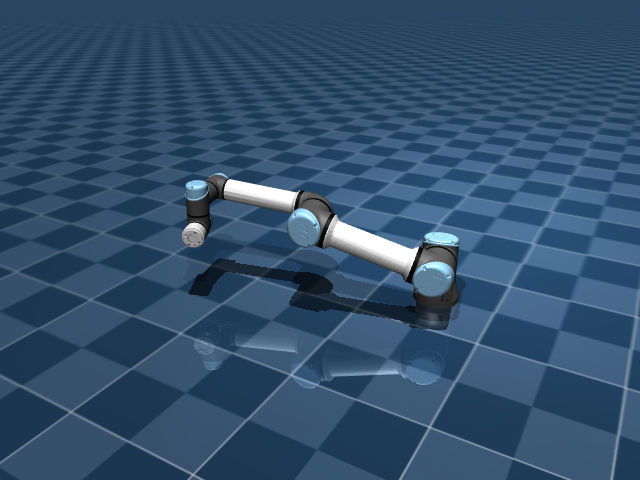
That is plenty for state-based DRL experiments on the laptop. Anything GPU-heavy (mjlab / MuJoCo-Warp, large vision policies) will go to the lab’s GPU server once access is set up.
The check script is in the repository: scripts/check_mujoco.py.
First state-based environment already running
As a last check this week I installed Gymnasium-Robotics 1.4.2 next to MuJoCo 3.11.0 and stepped FetchPickAndPlace-v4: a 25-dimensional state observation plus 3-dimensional achieved/desired goals, a 4-dimensional action, sparse reward. It runs at about 2,000 environment steps per second on the CPU, and a short SAC + HER smoke test with Stable-Baselines3 on FetchReach-v4 trains at roughly 200 steps per second including gradient updates. So the recommended stack from my first literature pass (goal-conditioned Fetch tasks + Hindsight Experience Replay) is usable on the laptop.
Plan for the next weeks
- Review the state of the art of DRL for state-based pick-and-place (goal-conditioned tasks such as the Fetch suite, Hindsight Experience Replay, off-policy algorithms like SAC/TD3, and more recent manipulation benchmarks).
- Get a first state-based pick-and-place environment running locally and train a baseline policy.
- Start mapping which explainability methods apply to a continuous-control policy with a low-dimensional state input.
- Read through my labmate’s mjlab-based project to align observation and action conventions.