Coding Period Week 4 (June 19 ~ June 25)
This week was all about integration and solving complex communication issues between VisualCircuit blocks. My primary goal was to finally get the Laser Mapping exercise running flawlessly inside the Robotics Academy using multiple interconnected VisualCircuit blocks.
🎯 The Main Goals for the Week
- Complete the codebase push to the repository after encoding the architecture and fully testing it.
- Run the Robotics Academy (RA) with VisualCircuit completely and make the Laser Mapping logic run.
- Make a complete video of the working Laser Mapping exercise and upload it to YouTube (Pending window activation fix).
🚀 Repository Updates & The Accidental Merge
My first task was to secure all of the Marketplace architecture code we have been building. I successfully uploaded all the required files into the VisualCircuit-resources folder.
However, in the main VisualCircuit repository, I created a Pull Request that I accidentally merged myself without proper verification due to a misunderstanding! Despite the slight hiccup, all the code has been successfully pushed and is now in the main repository.
🧠 The VisualCircuit Block Concurrency Bug
With the Marketplace code pushed, I shifted my full attention back to the Laser Mapping exercise.
At first, I tested the robot using a single block that directly published velocity commands to /turtlebot3/cmd_vel. That worked perfectly, which proved that the robot topic was correct and that the robot could move when it received a valid Twist message. In that single-block version, everything was happening in one place: the code created the velocity command, set linear.x and angular.z, and published it directly to the robot.
The Split Block Failure: After confirming the single block worked, I tried splitting the system into multiple interconnected VisualCircuit blocks. The robot instantly stopped moving! When I checked /turtlebot3/cmd_vel, it was publishing 0.0 for both linear and angular velocity. That showed that the publisher block was running, but it was not receiving the values from the previous block.
The Realization: The mistake was that I was using normal Python-style communication like outputs.linear_x = value and inputs.linear_x. According to my mentor, VisualCircuit blocks run in parallel, not sequentially, so normal variable passing between blocks does not work!
The Shared-Memory Solution
I dug into the VisualCircuit project files and discovered the correct shared-memory API. To pass data between parallel blocks:
- The correct way to send a number from one block is
outputs.share_number("linear_x", value) - The correct way to read it in another block is
inputs.read_number("linear_x")
Once I updated the block code to use share_number() and read_number(), the blocks could successfully pass values to each other in parallel!
🧩 The Final 4-Block Laser Mapping Architecture
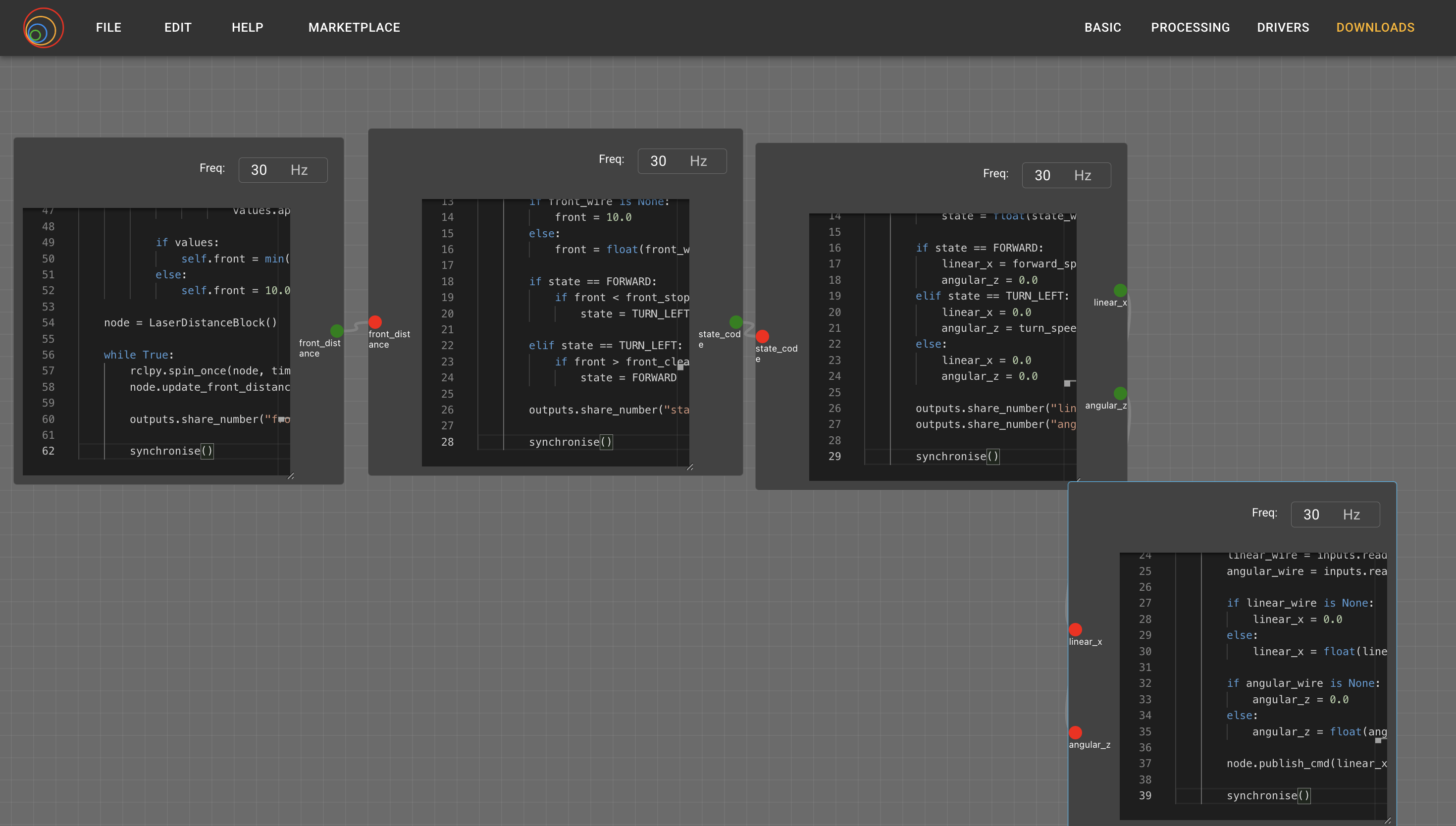
After fixing the API calls, I successfully split the system into four dedicated blocks:
- Laser Front Distance Block: Subscribes to
/turtlebot3/laser/scan, reads the laser ranges, and calculates the closest obstacle directly in front of the robot. It outputsfront_distance. - Decision State Machine Block: Receives the
front_distanceand decides whether the robot should move forward or turn left. It outputsstate_code. - Velocity Selector Block: Converts the decision code into actual velocity values, such as
linear_x = 0.70for moving forward orangular_z = 1.25for turning. - Cmd Vel Publisher Block: Receives
linear_xandangular_z, creates a ROSTwistmessage, and publishes it to/turtlebot3/cmd_vel.
💻 Testing in Ubuntu & Docker (RA)
I first tested this 4-block setup natively in my Ubuntu environment, and it worked flawlessly!
The main challenge was getting it to run inside the Robotics Academy Docker container. To achieve this, I:
- Logged directly into the terminal of the RA container.
- Pushed my blocks to GitHub.
- Cloned the repository inside the Docker terminal.
- Ran the blocks… and it finally started working!
🛠️ Outstanding Issues & Next Steps
While the logic is fully working inside the Robotics Academy, the exercise window is not getting active properly. I will be spending time next week to figure out what is wrong with the window activation.
Once that window issue is sorted, I will record the final, polished video of the working Laser Mapping exercise and upload it to YouTube!