Coding Period Week 5 (June 26 ~ July 2)
This week was incredibly productive! I managed to fully integrate the Laser Mapping exercise inside the Robotics Academy, completely revamp the VisualCircuit block communication structure, and successfully merge major pull requests to transition the Marketplace to the official JdeRobot repositories!
🚀 Progress & Major Achievements
1. The Laser Mapping Architecture Overhaul
We started the week by testing a simple, single Python ROS2 node script. It subscribed to /turtlebot3/laser/scan, calculated the front distance, decided whether to move forward or turn, and published velocity directly to /turtlebot3/cmd_vel. That worked flawlessly because the entire control loop was running inside one sequential node with perfect timing.
However, when we tried to split that logic into individual VisualCircuit blocks, the robot instantly stopped moving!
The Parallel Problem & Shared-Memory API: The first major issue was assuming the blocks would run one after another, like normal sequential Python code. VisualCircuit does not work like that! Each block runs in parallel as a separate process. If one block published 0.0 before another block shared the correct value, the robot just received zero velocity. We also realized that we were using the wrong output API. Instead of outputs.write(...), the correct way to pass values across wires in VisualCircuit is through the shared-memory API: outputs.share_number(...) and inputs.read_number(...). Fixing this immediately stopped the blocks from crashing and allowed data to flow across the wires properly.
Fixing the ROS Topics: We then noticed the code wasn’t using the correct topics for the TurtleBot3 inside the RA environment. The code had to be updated to use the namespaced topics:
/turtlebot3/cmd_vel/turtlebot3/laser/scan/turtlebot3/odom
2. The 5-Block Modular System
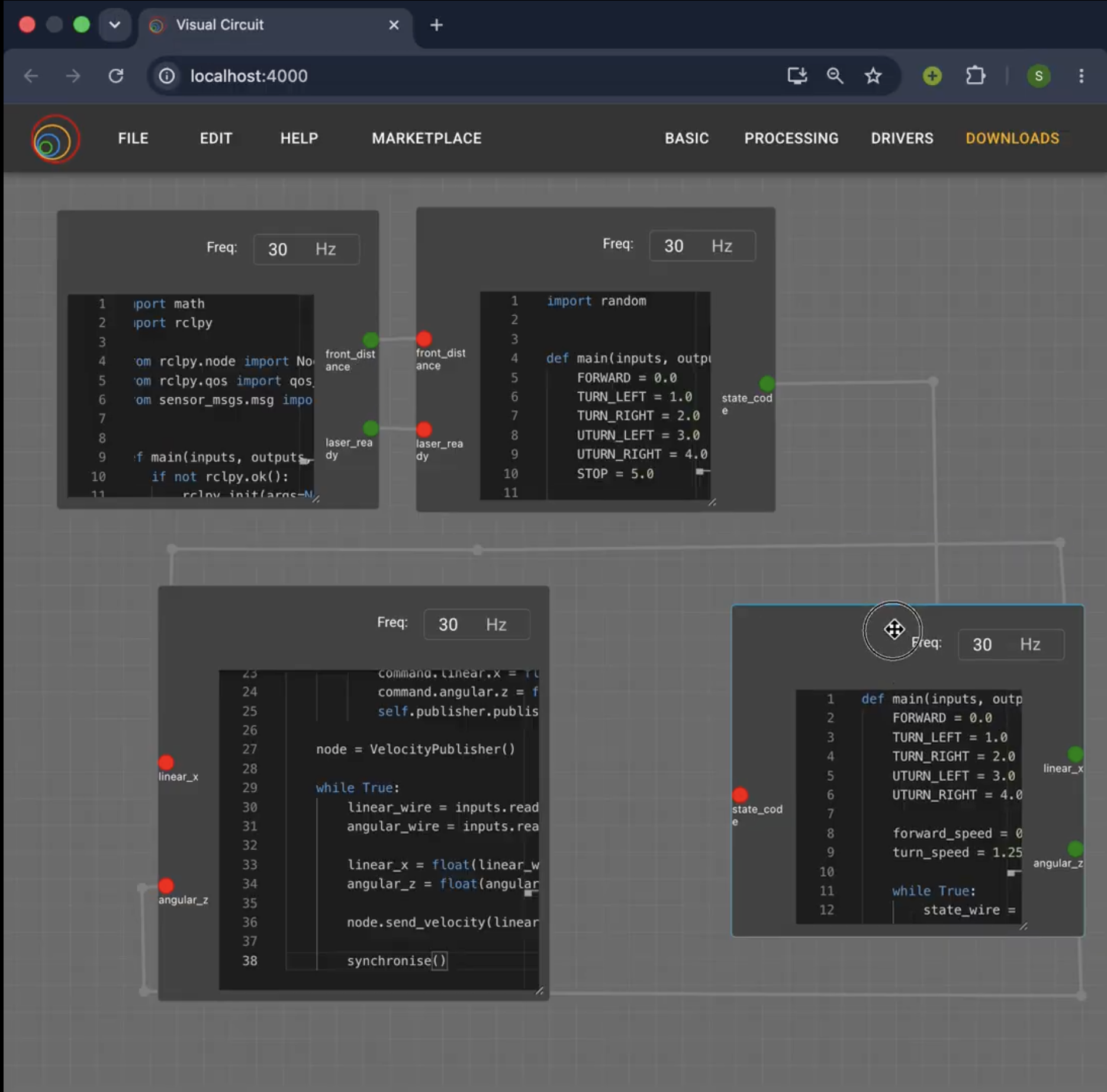
With the API and topics fixed, we successfully split the system into five clean, modular blocks:
- Laser Reader: Subscribes to the laser scan.
- Decision Controller: Calculates distance. When a wall is detected, it now randomly chooses to turn left, right, or do a 180-degree turn! This prevents the robot from repeating the exact same path indefinitely.
- Velocity Selector: Converts the decision into raw velocity numbers.
- ROS Velocity Publisher: Sends the
Twistcommand to/turtlebot3/cmd_vel. - Robotics Academy Map Publisher: Publishes the generated map directly to
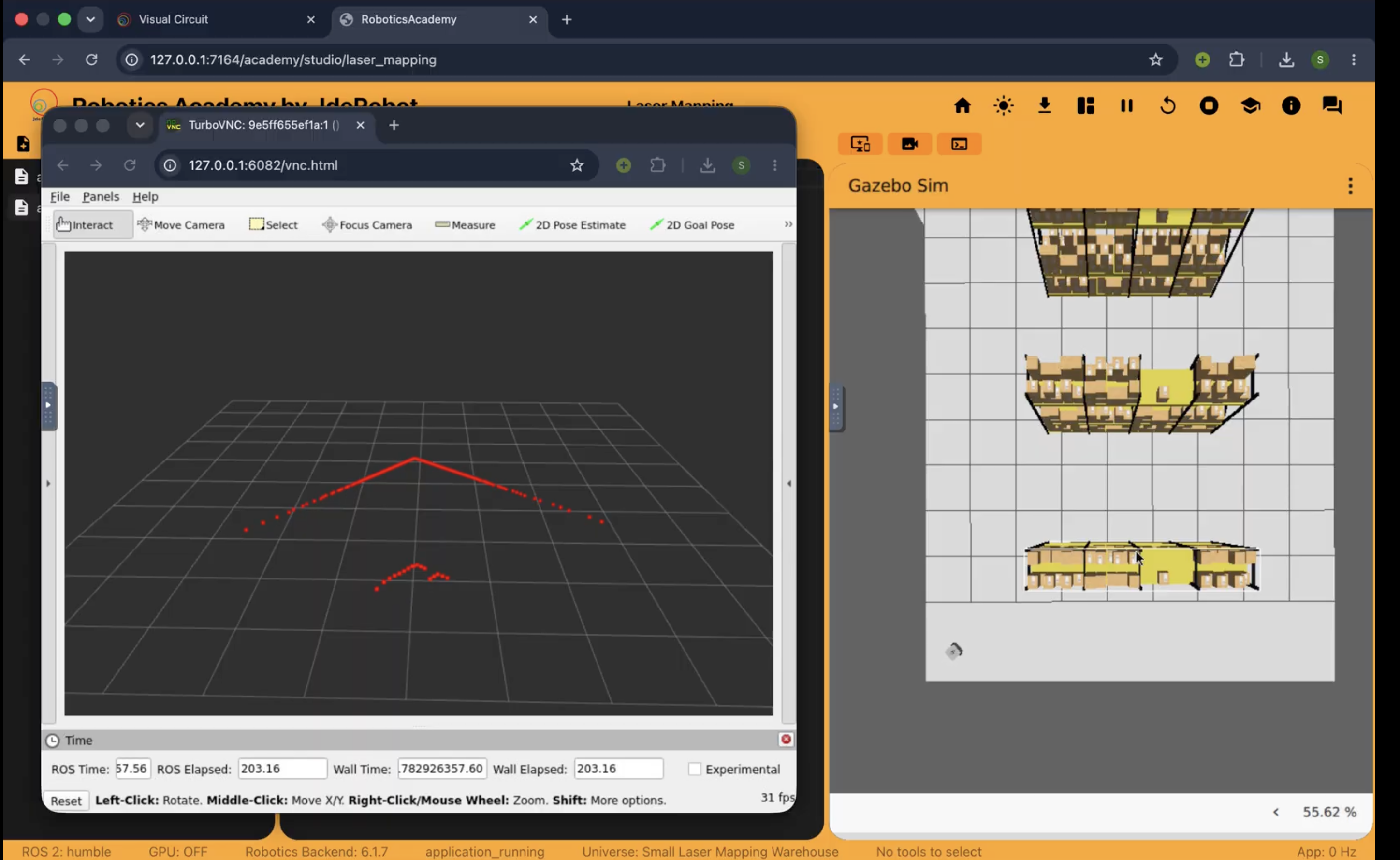
/webgui/user_mapso the visual map shows up natively inside the Robotics Academy display!
3. Execution Flow & RViz2 Debugging
The final, correct execution flow to run this is:
- Launch Robotics Academy and the TurtleBot simulation.
- Open the Docker terminal.
- Pull the latest GitHub block code.
- Run the VisualCircuit project so all blocks start in parallel.
- In another terminal, run
rviz2. - Select the laser scan, odometry, TF, and map topics to visually confirm the robot’s real ROS state vs. what the Python prints.
🔗 PR and Pulls
This week, I also updated the entire Marketplace architecture to point to the official JdeRobot servers instead of my personal fork!
- Main Repository (VisualCircuit): Updated the marketplace panel (
MarketplacePanel.tsx) to fetch the global registry file from the official JdeRobot repo. - Resources Repository (VisualCircuit-resources): Updated the automated GitHub Action (
update_registry.py) to build raw download URLs pointing to JdeRobot’s repository, and regenerated the globalregistry.jsonindex.
🤝 Mentor Meeting
We had a great sync to review the architecture and finalize the URL migrations.
🔮 Next Steps
- Record a perfect, high-quality showcase video matching the VisualCircuit theme (as suggested by my mentor) and upload it to YouTube!
- Search for and select the next 2 projects/exercises to begin working on for the upcoming weeks.