Coding Week 8 — Podman Compose Testing
This week mostly Focused on learning the podman architectures and whether or not migrating to Podman is a plausible strategy with also the conclusion of running the exercises with Podman compose.
Docker also works via rootless, then why not use it?
According to official Docker docs, it also supports rootless mode, but it needs manual configuration by the end-user ,the user needs to execute the rootless setup script
# it creates a user systemd service and a user socket
dockerd-rootless-setuptool.sh install
Then enable and start the user Docker service.In short the user needs to do an additional one-time configuration step to switch from system-wide daemon to per-user daemon.The friction for this step is unnecessary and as told in last time it is not daemonless just like podman , it still works with daemon as a background service permanently.Switching to podman decreases the resource usage there is no background process unless needed. Podman natively has better security and also has Docker compatible CLI commands.Podman is better for RoboticsAcademy as it has true daemonless architecture and also has minimal setup for students/users.For Maintainers it will have fewer failures since the failures that included the daemon are no longer there.
How much difference would there be with Podman instead of Docker?
For most RoboticsAcademy users, very little changes. The existing workflows such as building images, running the exercises, using Compose, mounting volumes and exposing ports remain largely the same because both Docker and Podman implement the OCI container standards.
The differences become noticeable mainly in the following scenarios:
-
No need for the
dockergroup. With Docker, many users add themselves to thedockergroup to avoid usingsudo, even though Docker’s documentation warns that this effectively grants root-equivalent access. Podman avoids this entirely by running containers as the current user. -
Better support for shared laboratory environments. Since Podman is rootless by default, multiple students can use containers on the same machine without requiring administrator privileges or sharing a system-wide daemon. This makes deployments on university lab machines considerably easier.
-
Simpler recovery for beginners. A user’s containers and images remain isolated within their own home directory. If a student wants to reset their environment, they can remove only their own Podman storage without affecting other users or requiring privileged cleanup.
From a maintainer’s perspective, the migration mainly simplifies the container runtime itself rather than changing the development workflow. Existing commands and Compose files require minimal changes, while eliminating the daemon removes an entire component that previously had to be installed, managed and debugged.
Overall, the migration is less about introducing new functionality and more about providing a simpler and safer default environment without significantly changing how RoboticsAcademy is used. How much difference would be there with Podman instead of Docker?
Current Status of the Podman Migration testing :
Mentor’s ask was narrow: get the RoboticsAcademy image building and running under Podman, no GPU required for this pass, and call it a success if the image compiles and one exercise launches inside RA. Performance, the full exercise catalog, and GPU support were explicitly out of scope for this round.
Getting the Full Stack Up
A standalone container is one thing, a compose stack is another. Two things had to be sorted before docker-compose running against the Podman backend would even attempt to bring the stack up.
First, Podman doesn’t run a background daemon by default, so compose had nothing to talk to until I started the API socket: systemctl --user start podman.socket, enabled for persistence afterward.
Second, the compose file I was testing with requested an NVIDIA device reservation and /dev/dri access, which Podman couldn’t interpret and wasn’t needed for this pass anyway. Made a GPU-free copy, dev-test-compose.podman.yaml, for the test.
Third, Podman keeps its own image store, separate from Docker’s. The images built in last week’s Podman test weren’t visible to compose under the names it expected, jderobot/robotics-academy:test and jderobot/robotics-database:latest, until I retagged them.
With both sorted, the stack came up clean, database healthy, app Up.
Stale Checkouts Across Three Repos
Getting an exercise to actually load turned into the most confusing part of the week, and none of it was Podman’s fault .I just hadn’t pulled the latest commits across three different repos, all renamed the same day, July 7th, as part of one coordinated cleanup.
The frontend bundle was still calling get_universes_list, renamed to get_worlds_list, fixed with yarn install && yarn run build. The RoboticsInfrastructure submodule had renamed universes.sql to worlds.sql, breaking a bind mount, fixed with a one-line path change (the same stale reference is still in the tracked compose files under compose_cfg/ on humble-devel). And src/, a separate nested clone of RoboticsApplicationManager about 35 commits behind its upstream, had renamed world to scene in the frontend-backend message format, throwing KeyError: 'world', fixed with a git pull.
Once all three were current, follow_line launched end to end, noVNC came up, the simulation loaded, and running the exercise’s code got a response from the robot.
A Real Podman Difference: chmod Fails on Root-Owned Files
Autosave, the save that fires automatically when leaving an exercise’s editor, threw an “Error saving file:” popup with no message attached. This one was worth tracing properly rather than shrugging off.
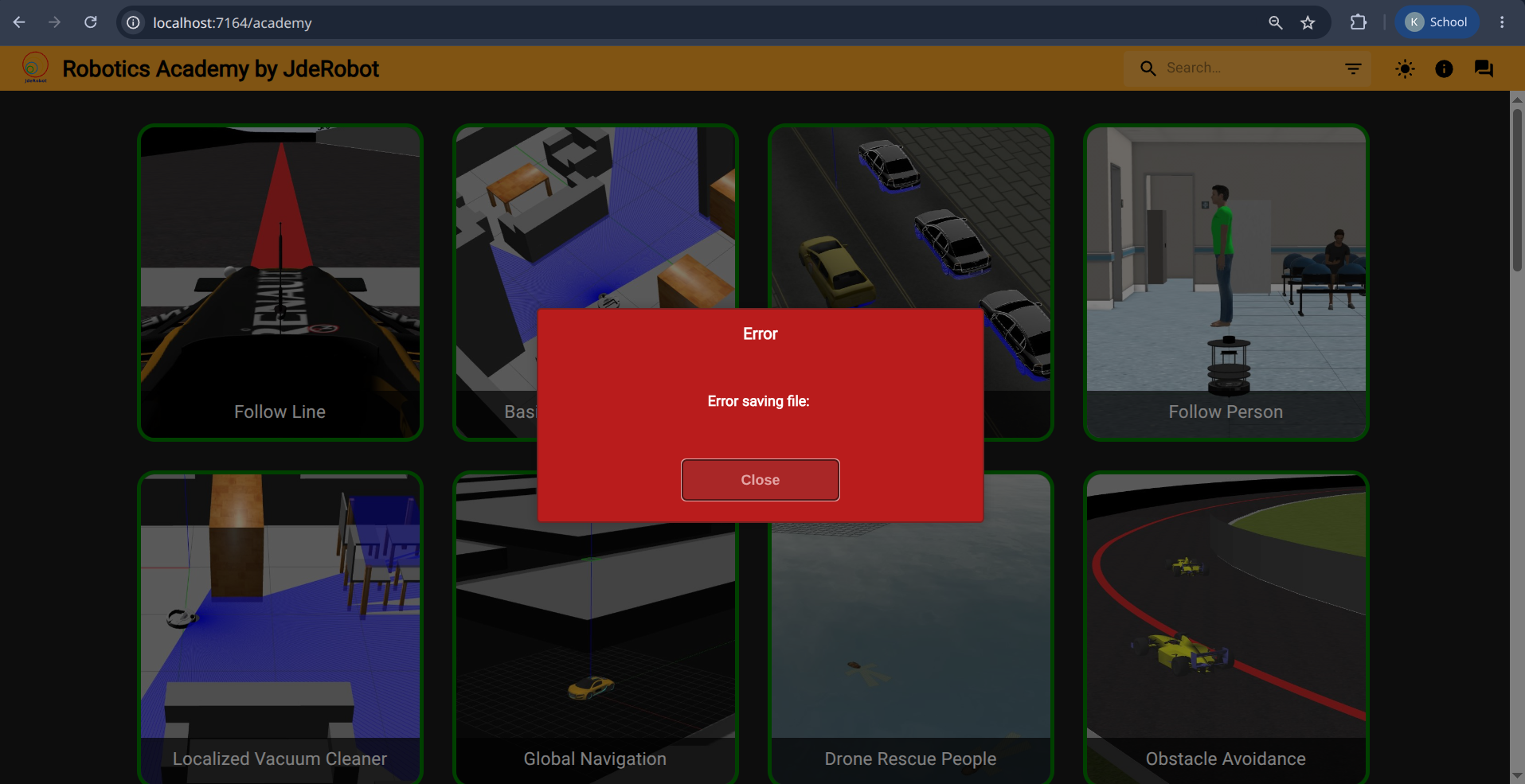
Turned out the save itself worked. The file’s new content wrote to disk without a problem. What failed was the step right after it, an attempt to reset the file’s permissions back to fully open, and that failure is what surfaced as the error.
The reason traces back to how this particular file came to exist. It’s a per-student workspace file, filesystem/follow_line/academy.py, that RoboticsAcademy creates the first time an exercise gets opened, and this one had been sitting around since May, created weeks earlier while testing with plain rootful Docker, whose containers run as genuine root on the host. Rootless Podman doesn’t work that way by design. Its container’s “root” is really just the local user wearing a disguise, so it could still write new content into a file it doesn’t own, but it couldn’t change that file’s permission bits, since that specifically requires real ownership. The error code confirmed exactly this: EPERM, not the more familiar EACCES, the standard signature of an ownership mismatch rather than a plain access problem.
Nothing was lost. The edit itself saved, only the permission reset failed, and the popup came back blank because of a separate, preexisting bug where the frontend only reads error text from one field while this class of backend error sends it under another. Unrelated to Podman, and it would hide the same message under regular Docker too.
Result
The full stack ran under Podman, follow_line launched, and the simulation responded to code, which was the whole goal for this round. Everything that got there outside the codebase itself: two one-time host/Podman config changes, one scratch GPU-free compose file, three unrelated stale checkouts pulled up to date, and one genuine, reproducible Podman-vs-Docker behavior difference around rootless UID handling on legacy root-owned files.
What’s Next
Testing if the podman works with the GPU enabled which is the main pain-point of using podman Part of my GSoC 2026 work with JdeRobot. Project tracked at github.com/TheRoboticsClub/gsoc2026-Kartik_Jangid.