Week 7: Workspace Limits, Dataset Generation, and Planning Observations
Testing the kinematic workspace limits of the UR5e, generating a 50-episode imitation learning dataset, and analyzing collision-awareness limitations in the planning pipeline.
Week 7 — Workspace Limits, Dataset Generation, and Planning Observations
Author: Ahmed
Internship Week: 7
Project: Digital-twin pick-and-place for scalable imitation learning (MobRT-inspired)
Stack: ROS 2 (Jazzy), MoveIt2, MuJoCo (mujoco_ros2_control), Python, HDF5
1. Testing the Kinematic Workspace Limits
Following the goal to test whether the relative-coordinate solver works when the robot base moves, I systematically moved the robot backward in 0.1m increments and recorded a video at each step. The objects remained at their exact same absolute world coordinates.
Results
| Robot Base Shift | Outcome | Observation |
|---|---|---|
| 0.1m back | ✅ Success | Smooth, natural movement. |
| 0.2m back | ✅ Success | Slightly longer trajectory, still highly efficient. |
| 0.3m back | ✅ Success | Robot stretching near kinematic limits. |
| 0.4m back | ❌ NO_IK_SOLUTIONack | Planner struggles; joint-space fallback triggered. |
| 0.5m back | ❌ NO_IK_SOLUTION | Exceeds UR5e’s 850mm physical reach limit. |
This empirically maps the valid workspace boundary for this specific pick-and-place task. The relative-coordinate math works perfectly within the reachable envelope — the failure at 0.5m is purely a hardware limit, not a software bug.
2. Automated Dataset Generation (50 Episodes)
I built a fully automated data collection loop that:
- Randomizes the object position within the safe workspace (
X: -0.60 to -0.20,Y: 0.00 to 0.30,Z: 0.80). - Executes the relative pick-and-place pipeline.
- Records joint states, end-effector poses, and object poses at 20 Hz.
- Saves each successful episode as a unique
.hdf5file compatible with MobRT / Diffusion Policy.
Dataset Structure
Each .hdf5 file contains: ```text / ── actions # Shape: (T, 6) — target joint positions └── observations/ ├── qpos # Shape: (T, 6) — joint angles ├── qvel # Shape: (T, 6) — joint velocities ├── ee_pos # Shape: (T, 3) — end-effector XYZ └── obj_pos # Shape: (T, 3) — object XYZ (relative to robot)
Result: 50 unique episodes, ~23 KB each, saved to ~/ros2_ws/dataset/.
3. System Architecture
The project relies on strict synchronization between two parallel worlds: the MuJoCo Physics World and the ROS 2 / MoveIt Planning World.
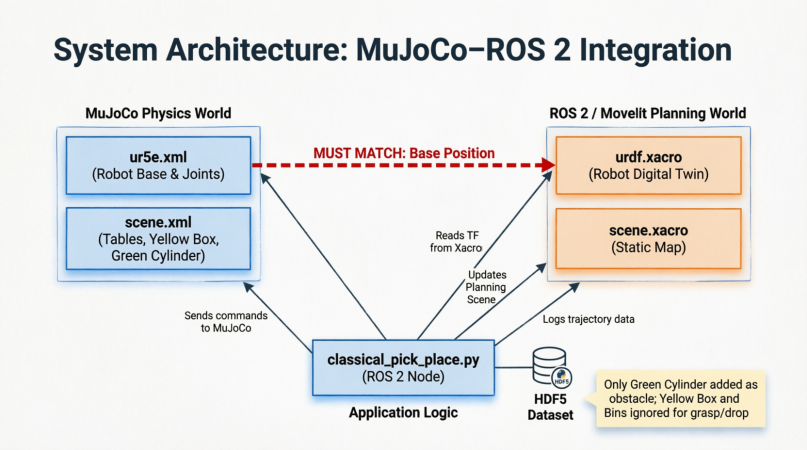
Figure 1: The data flow between MuJoCo (physics), ROS 2 / MoveIt (planning), and the Python application logic. The red dashed line marks the critical synchronization rule: the robot base position must match exactly in both ur5e.xml and urdf.xacro, or the TF tree breaks.
Key Design Decisions
- Smart Blindness: The yellow box (being picked) and the target bins are intentionally excluded from the MoveIt planning scene. If they were included as solid collision objects, the planner would throw
GOAL_IN_COLLISIONerrors and refuse to grasp or drop. - Dynamic Obstacle Sync: The green cylinder and other non-target objects are dynamically added to the planning scene via
sync_obstacles(), so the robot actively avoids them during transfer.
4. Observations and Open Questions
While generating the dataset, I noticed two important limitations that I want to discuss with Prof. Cañas:
4.1 Collision Awareness of Dynamic Objects
The robot currently lacks collision awareness for the dynamic objects (like the yellow box it is carrying). I tried adding the target boxes as collision objects, but the core issue remains: dynamic objects are not treated as obstacles during planning, unlike fixed elements like tables or targets.
In a production system, this would be solved using MoveIt’s Attached Collision Object feature — attaching the yellow box to the gripper’s collision mesh the moment it is grasped, so the robot plans paths knowing it is carrying a physical volume.
4.2 Path Optimization Inconsistency
Sometimes the joint angle movements are not optimal (not the least-cost path as expected), and the trajectory varies inconsistently from one run to another. This is likely because:
- The IK solver is purely geometric (no collision awareness)
- The MoveIt planner sometimes falls back to joint-space moves that bypass collision checking
- The
Z_TRAVELsafety highway height varies slightly based on the random object position
4.3 Can Imitation Learning Solve This?
My key question for the next meeting: Can imitation learning naturally absorb these planning inefficiencies? If the dataset contains mostly successful trajectories (even with suboptimal paths), will a Diffusion Policy or ACT model learn to generalize and produce smoother, more consistent motions — or will it inherit the planner’s inconsistencies?
5. Next Steps
- Discuss collision-awareness improvements with Prof. Cañas (Attached Objects, learned collision avoidance)
- Investigate whether the dataset quality is sufficient for training, or if path optimization needs to be improved first
- Begin initial training experiments with the 50-episode dataset
- Explore increasing dataset size to 100–200 episodes for better generalization
This week’s work demonstrates that the relative-coordinate solver is robust within the robot’s kinematic workspace, and that a functional imitation learning dataset pipeline is now in place. The remaining challenges are around planning quality and collision awareness — questions that may be partially resolved by the learning process itself.